

Screenshots



Description
- Payment
Obsidium SoftwareSize
3 MBVersion
1.7.15Requirements
5.0Get it on
Report this app
Images
Mod Info
- Full Version
Description
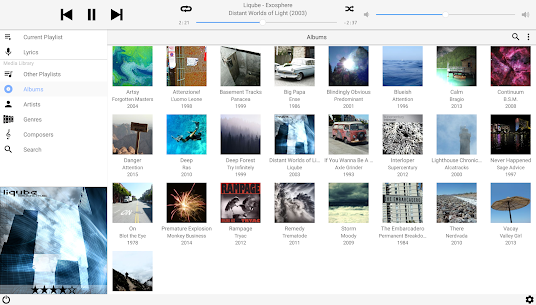
MonkeyMote Music Remote gives you a full-fledged wireless music remote control for your Android phone. It fully supports the popular foobar2000, MediaMonkey, Winamp, AIMP, and JRiver Media Center media players.
MonkeyMote Music Remote turns your Android device into a powerful and wireless music controller for your favorite media players. It seamlessly integrates with popular platforms like foobar2000, MediaMonkey, Winamp, AIMP, and JRiver Media Center, offering an array of features to enhance your music listening experience.
Comprehensive Playback Control
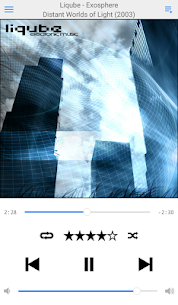
MonkeyMote provides full control over your media player’s playback functions. Whether you want to play, pause, skip tracks, or rewind, you can do it all from the convenience of your Android phone. This wireless remote ensures you never miss a beat, even when you’re away from your computer.
Song Information and Visuals
Stay connected to the music with MonkeyMote’s real-time display of song information. View track details, lyrics, and cover art directly on your phone. This feature allows you to dive deeper into the songs you love and enjoy every moment.
Playlist Management
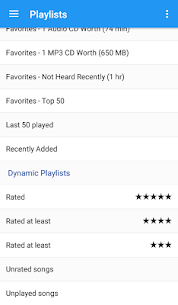
With MonkeyMote, managing your playlists is a breeze. You can view the current playlist, make changes, and load your saved playlists straight from your library. It gives you complete control over your music library, whether you’re at home or on the go.
Library Browsing and Queuing
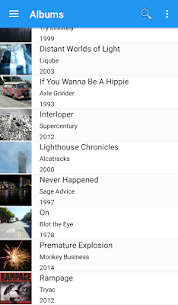
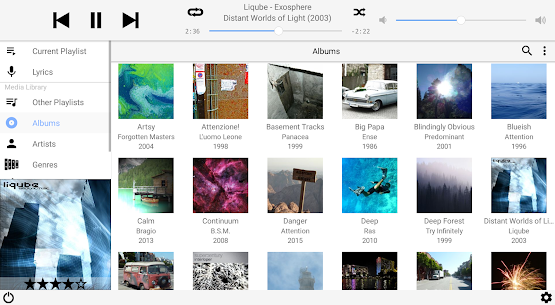
Browse through your extensive media library and instantly queue up your favorite songs. The app’s search function helps you find specific tracks quickly, ensuring that the perfect soundtrack is always at your fingertips.
Rating and Customization
MonkeyMote allows you to rate songs directly from your phone, helping you curate your collection and discover new favorites. The app also supports saving multiple connection profiles, making it easy to switch between different media players or computers.
Lightweight and User-Friendly
MonkeyMote is designed to be small, fast, and efficient, with minimal impact on your device’s resources. It only requires basic permissions, ensuring a secure and hassle-free experience. Setting up and using MonkeyMote is straightforward, letting you enjoy your music without technical headaches.
System Compatibility and Automatic Server Discovery
MonkeyMote connects to your Windows PC via WiFi, and it features an automatic server discovery function (available for Android 4.1 and later). However, this feature is not supported by all devices and is disabled on devices running Android 4.4 or earlier due to a potential operating system bug that could cause reboots.
Future Enhancements
MonkeyMote’s developers are continually working on adding new features and improving tablet support. Stay tuned for updates that will further enhance your music remote experience.
Getting Started and Support
To get started with MonkeyMote, simply download and install the plugin installer for your preferred media player from http://www.monkeymote.com. In case you encounter any issues during setup or use, visit the support page at the same website for assistance.
MonkeyMote Music Remote is the ultimate solution for music enthusiasts seeking a wireless and feature-packed remote control for their media players. With its user-friendly interface and wide range of functionality, it’s a must-have for anyone looking to elevate their music listening experience.
Related apps
Poke Genie 8.19.1 Poke Genie 107.92 MB Poweramp Music Player build-1031-uni Poweramp Software Design (Max MP) 25.21 MB Premium Unlocked SpotiDuck 1.2.4 SpotiDuck 2.89 MB Ad-Free Murglar 6.9.325-stable Murglar 22.39 MB Premium Unlocked Play Music Files Offline App 1.5.6 Tresor Tech 43.34 MB Premium UnlockedHow to install
- Download the APK file above to your phone.
- Allow “Install unknown apps” when prompted.
- Open the downloaded APK and tap Install.
- If the package includes OBB/XAPK data, follow the bundled instructions.
MOD APKs are modified builds, so Play Protect may show a warning. Install only if you trust the file; use at your own risk.