

Screenshots
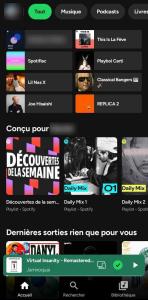
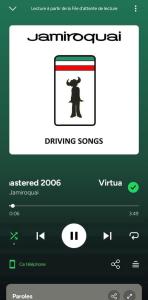
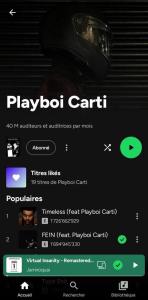
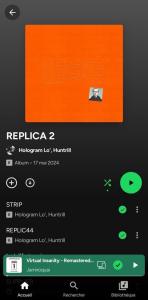




Description
- Home /
- Apps /
- Music & Audio
Myspoti (Spotify Client) 2.0.2-beta.3
- Music & Audio
Stream Spotify completely ad-free and download your favorite tracks right from a free account. Access your personal library, custom playlists, and Spotify Wrapped through a native Android interface that eliminates commercial interruptions while delivering lossless offline audio. Developer: Kotazo | Size: 13.18 MB | Version: 2.0.2-beta.3 | Requirements: Android 10+ | Mod Info: No Ads
- Telegram
Report App
Screenshots
App Overview
Enjoy an uninterrupted Spotify experience with full offline downloading on a standard free tier. Seamlessly retain your playlists, saved tracks, and annual Wrapped summaries inside a smooth Android client engineered to block commercials and save high-fidelity music directly to your device.
Why Choose Myspoti?
✨ Completely Ad-Free Playback on Free Accounts Say goodbye to disruptive audio commercials, banner promotions, sponsored video ads, and mandatory 30-second delays. Myspoti disables every promotional interruption built into Spotify, upgrading standard free accounts to a Premium-style workflow with on-demand track selection and unlimited skips—no root access or patched APKs needed.
✨ High-Fidelity Lossless Offline Downloads Save individual tracks, complete albums, custom playlists, or your entire Liked Songs collection for offline playback anywhere, whether in flight or commuting without cellular coverage. Enjoy pristine sound quality that surpasses standard streams, offering lossless FLAC (up to 24-bit studio hi-res when available) or compact AAC formats. Myspoti matches exact studio recordings via ISRC codes against Tidal and Qobuz with pre-save verification (configurable in Settings), while downloaded playlists update automatically whenever you add new tracks on Spotify.
✨ Full Spotify Ecosystem Plus Exclusive Enhancements Retain every core feature you rely on—Home discovery, search, personal libraries, podcasts, Spotify Connect, and Android Auto integration—alongside synchronized karaoke-style lyrics, official visual music videos, and Genius background annotations.
Understanding Myspoti Myspoti operates as an independent, standalone Android client. Authentication takes place directly through Spotify’s secure official web portal, guaranteeing your login credentials remain strictly confidential. A standard free profile is all that is required.
Behind the scenes, the official Spotify Web Player handles playback invisibly using your device's native DRM pipeline, while Myspoti overlays an intuitive, responsive interface. Every play is reported accurately to Spotify's servers, preserving your artist support, listening history, and yearly Wrapped analytics.
Quick Setup Guide ● Select 'Log in with Spotify' and enter your credentials. ● Choose your preferred audio fidelity, grant necessary permissions (notifications, Bluetooth, local storage), and begin streaming.
✨ Core Features & Playback Listening Experience ● Complete No Ads implementation. ● Streamlined access to Home, Search, Browse, New Releases, and structured Libraries with custom folders, album views, artist hubs, and profile pages. ● Complete track control: on-demand playback, regular and Smart Shuffle, editable queue management, repeat modes, audio crossfade, and a sleep timer. ● Dedicated podcast and audiobook player featuring variable playback speeds, 15-second skip intervals, and finished-episode tracking. ● Broad connectivity options including Spotify Connect, Jam sessions, customized Bluetooth device labeling, lock-screen controls, interactive widgets, and Android Auto.
Lyrics and Visual Media ● Real-time synchronized lyrics with word-by-word highlighting (or standard line-by-line display adjustable in Settings), accompanied by language translation. ● Genius background insights: quick-access track trivia via the lightbulb icon and detailed stanza explanations through a long-press on underlined verses. ● Synchronized official music videos with full-screen playback; watch quietly alongside music or switch to video audio while keeping your Spotify stream count active.
Playlist Management ● Build, customize (titles, cover art, descriptions), reorganize, and set privacy levels for personal or public playlists. ● Seamlessly discover and insert new tracks straight from in-app search queries with automatic recommendations. ● Collaborative listening: generate shareable invite links, monitor participant activity, and see which member added specific tracks. ● Share tracks, artists, and playlists via direct links or scannable Spotify Codes.
Offline Functionality ● Download individual songs, full discographies, curated playlists, and Liked collections in CD/Hi-Res FLAC or efficient AAC formats, verified via Tidal and Qobuz ISRC matching. ● Downloaded content is secured locally within Myspoti and syncs seamlessly with changes made on your primary account. ● Fully integrated local music file playback.
Additional Highlights ● Personal local recap highlighting your most-played tracks, artists, and albums. ● Multilingual interface supporting English, French, German, Spanish, Italian, Portuguese, and Greek. ● Power-saving preferences, data saver options, customizable accent themes, and a true AMOLED dark mode.
Version Changelog Starting from 1.1 Release 2.0 introduces an entirely redesigned application architecture, rebuilt completely from the ground up.
● A new engine delivers faster screens, quicker skips, and playback that recovers on its own when Spotify's player stumbles. ● Ads are blocked at the source rather than skipped. ● Lossless downloads (FLAC, hi-res) replace YouTube audio, encrypted on your phone. ● Word-by-word lyrics come from more sources, along with Genius song meanings. ● Music videos play with their own sound, in full screen and better quality. ● Collaborative playlists, an Add songs screen, and full playlist editing are included. ● Smart Shuffle, a draggable queue, and crossfade are available. ● Podcasts and audiobooks are back, with their own player and downloads. ● Share Spotify Codes, and enjoy profiles, Recents, Browse, and New releases. ● Four new languages, in-app updates, and a diagnostic report you can send in one tap.
Questions Is it safe for my account? Myspoti communicates with Spotify the same way its web player does, and you sign in on Spotify's own page. Blocking ads still goes against Spotify's Terms of Use (see the disclaimer below).
"Spotify refused to play this"? Some new or free accounts are refused by Spotify. Go to Settings → Export a diagnostic report and send it on Discord or in an issue. It includes the app's recent log (what Spotify responded) and your phone's model, but never your password or login tokens.
Do downloads count in my Wrapped? No. Songs played from a download are not reported to Spotify and count only in Myspoti's own recap. Streamed songs and music videos count as usual.
What leaves my phone? Your plays go to Spotify. Lyrics are looked up on lyrics sites, song meanings on Genius, translations on Google Translate, music videos on YouTube, and downloads from the Tidal or Qobuz sources. Nothing is sent to the developer.
Not included ● No DRM circumvention and no Spotify audio downloads: offline songs come from lossless catalogues, and a song with no lossless source is marked unavailable. ● No ad is ever marked as heard.
Disclaimer Blocking ads goes against Spotify's Terms of Use, and Spotify may suspend accounts that do so. Use this app at your own risk. If you can, support artists with Premium or by buying their music.
Not affiliated with or endorsed by Spotify. Spotify is a trademark of Spotify AB.
Related apps
XEQ Equalizer & Bass Booster 42.8.0 by FrackStudio, 8.63 MB, Premium Unlocked. A music player and MP3 player app, MMusic 2.3.0 by ICC Tech, 28.55 MB, Premium Unlocked. PodsLink, AirPods Battery 1.4.4 by PodsLink, 22.46 MB, Premium Unlocked. Song Finder: Music Identifier 1.4.4 by Virals Dijital Hizmetler A.S., 12.46 MB, Premium Unlocked. Stash (Spotify + YouTube Music Client) 0.9.119 by Stash, 163.02 MB, No Ads.
How to install
- Download the APK file above to your phone.
- Allow “Install unknown apps” when prompted.
- Open the downloaded APK and tap Install.
- If the package includes OBB/XAPK data, follow the bundled instructions.
MOD APKs are modified builds, so Play Protect may show a warning. Install only if you trust the file; use at your own risk.