
Screenshots
Description
When your home screen has turned into a cluttered mess of icons, changing the wallpaper won't fix the real issue. Material Pixel Launcher Pro APK swaps out that part of Android with ALauncher, a Pixel-style launcher from DWorkS. It takes control of the home pages, dock, app drawer, search bar, and long-press actions on app icons. The lock screen, notification shade, and Android settings keep the phone maker's original design.
The Pro version is released as a separate paid package under dev.dworks.apps.alauncher.pro, next to the free Material Pixel Launcher Lock listing. DWorkS doesn't offer a setting-by-setting breakdown of the two. The package name is clear, but exactly where the line falls between free and Pro features is not.
The screen you come back to
Once ALauncher is set as your Home app, pressing Home takes you to its layout instead of the launcher that came with the phone. Your installed apps and their data stay untouched. You can switch back at any time, but an arrangement built in ALauncher doesn't carry over to another launcher.
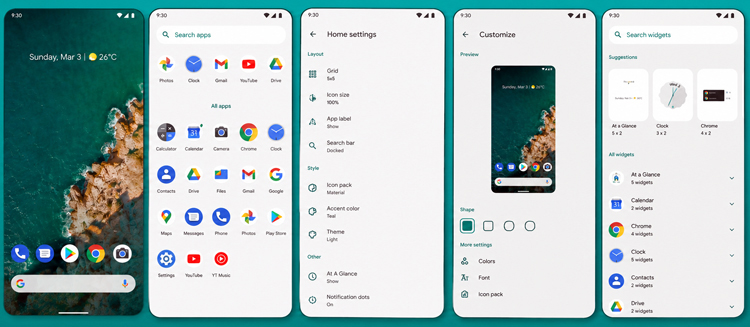
Grid settings control how much fits on each page. If your shortcuts are spread across several screens, adding rows and columns can bring them together in one place. Someone who opens most apps through search might prefer the opposite: a few large icons, plenty of breathing room, and a short dock. The dock has its own icon count and background setting, so it doesn't have to match the page above it.
Rotation support is available for using the home screen sideways. Once your icons and widgets are where you want them, desktop locking stops accidental drags from moving them around. This lock only protects the layout from editing. It doesn't lock the phone or any app.
ALauncher doesn't have to follow your wallpaper. You can keep it light or dark, or have it pull its theme from the wallpaper when that suits you. This choice applies only to the launcher screens and won't recolor Android settings. Icons can be resized or reshaped, and third-party icon packs can replace their artwork. If a pack doesn't cover one of your installed apps, that app may keep its original icon. The layout also flips to right-to-left when an RTL language is selected.
An app's name is often easier to remember than where it sits on screen. Open the drawer, type a few letters into the search bar at the bottom, and tap the result. On a carefully arranged home page, the same bar and its suggestions can be hidden. You can pick which search provider powers the bar in ALauncher's settings.
Two swipes and a long press
Swipe down once from Home to open notifications, or use two fingers for Quick Settings. On a tall phone, this saves you from stretching to the top edge over and over. These gestures work while ALauncher is in use; other apps keep their own swipe behavior.
Long-press menus depend on the app under the icon. A supported app may show one of its own direct actions, while ALauncher adds options for app info or uninstalling. Some icons will offer more choices than others, since the launcher can't create a shortcut that neither the app nor Android provides.
Notification dots also rely on Android support and the required notification permission. The dot signals that a related system notification exists. It isn't a separate unread counter kept by the launcher, so clearing that notification may remove the dot even if the app still has unseen items.
Google Feed is the tricky part
The standard launcher package can't provide the left-side Google Feed or the full At A Glance connection on its own. DWorkS offers a separate Companion Bridge because Google restricts this kind of feed access for third-party launchers. Installing the bridge is optional, and the regular home pages, drawer, search, and gestures work fine without it.
Phones that already have the genuine Pixel Launcher as a system app are a special case. DWorkS warns of a conflict on some Pixel and Nokia phones. The bridge may refuse to install there, even though ALauncher itself can still be used.
Hidden Space removes selected apps from the regular drawer, but it shouldn't be treated as a private vault. The apps stay installed and can still show up in Android settings or through ALauncher's hidden area. Their files and signed-in accounts aren't encrypted just because the icons are out of sight.
Locking features may ask for Device Administrator access. The developer ties this permission to the lock action and describes it as optional. You don't need to grant it if you're only using ALauncher to change the grid, search bar, icons, or theme.
How to install
- Download the APK file above to your phone.
- Allow “Install unknown apps” when prompted.
- Open the downloaded APK and tap Install.
- If the package includes OBB/XAPK data, follow the bundled instructions.
MOD APKs are modified builds, so Play Protect may show a warning. Install only if you trust the file; use at your own risk.