
Screenshots
Description
GSM Droid Pro 4.4 APK is an advanced Tools app for Android devices.
Get the latest version of GSM Droid Pro APK for Android via direct download link at GameMod.dev.
GSM Droid serves as an essential utility for operating equipment integrated with GSM modules that receive instructions through text messages, DTMF tones, or regular phone calls. Practical use cases include:
– Alarm controllers – Auto-dialers – Residential and vehicle security systems – Smart home setups – Industrial automation equipment – Intelligent metering – Wireless remote management – Answering machine remote handling – Speed dial functionality for IVR setups and call centers
With GSMDroid, you can easily:
– Keep custom command collections tailored to multiple GSM modules – Configure distinct devices and pair each with specific instruction profiles – Edit instructions right before dispatching them – Safeguard app entry with PIN or password protection – Archive incoming and outgoing SMS history for your devices – Create backups of your local application database – Place direct voice calls to connected GSM hardware – Transmit dual-tone multi-frequency (DTMF) audio signals
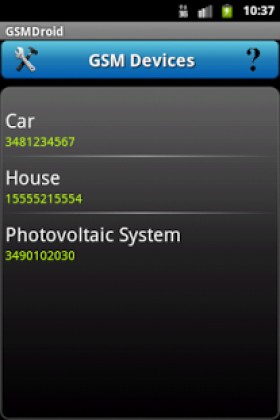
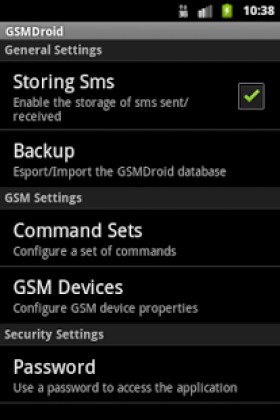
Tapping the "Settings" icon opens up the main configuration screen. Through the "Command Sets" section, you can build and tailor instruction lists, while the "GSM Devices" tab lets you register or edit target hardware by specifying a custom name, its active SIM phone number, and the assigned instruction set. When assigning actions, you can toggle between SMS text, DTMF tones, or audio calls. Moreover, the "Password" screen enables you to secure the app against unauthorized access by configuring a security code and protection tier. Database backups and restores are also managed here. To trigger an action, simply pick a device from your registered list and select the command you wish to execute; you may also tweak the parameters on the fly prior to transmission.
Note: Certain IVR architectures demand a brief delay between sequential tones for accurate signal processing. Simply place one or multiple commas between characters in your DTMF sequence; each comma introduces a 2-second pause.
This utility supports virtually all GSM module hardware on the market, including leading brands such as Cinterion, SIMCom, Bentel, Wavecom, Telit, Garmin, CEP, Ontech, Telic, Huawei, Matrix, RF Solutions, Sierra Wireless, Fracarro, Eurogsm, Combimax, Trevis, Tecnoalarm, Siemens, and more.
For feature requests, feedback, or bug reports, feel free to reach out by email. If you run into any trouble while using the app, please get in touch before leaving negative ratings so we can help resolve the problem.
Hardware developers and GSM module manufacturers looking for a customized, white-label release of GSM Droid featuring their own brand identity can inquire via email.
Keywords: gsm, sms, dtmf, ivr, alarm, dialer, security, home, automation, remote, control
GSM Droid Pro APK
GSM Droid Pro APK
What’s New
How to install
- Download the APK file above to your phone.
- Allow “Install unknown apps” when prompted.
- Open the downloaded APK and tap Install.
- If the package includes OBB/XAPK data, follow the bundled instructions.
MOD APKs are modified builds, so Play Protect may show a warning. Install only if you trust the file; use at your own risk.