
Screenshots

Description
- Home /
- Apps /
- Tools
DROFUS – ISO 2 USB MOD APK (Premium Unlocked) 12.3.3
- Tools
🔥 DROFUS — ISO Burner for Android TELEGRAM Report Developer MixApplications Size 90 MB Version 12.3.3 Requirements 7.0 Get it on
- Telegram
Report this app
Images
Mod Info
- Premium Unlocked
Description
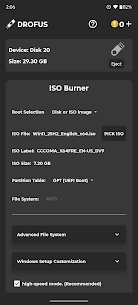
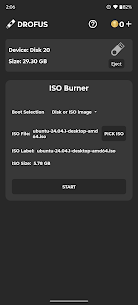
DROFUS is a standalone ISO burning tool built for Android. Whether you need a bootable Windows installer or want to flash a Raspberry Pi image, DROFUS puts you in charge of partition schemes, file systems, and image handling. It's built for speed, accuracy, and hands-on configuration.
🔥 DROFUS — ISO Burner for Android (also known as ISO 2 USB or ISO to USB)
Write complete operating system images straight to a USB drive, no PC needed.
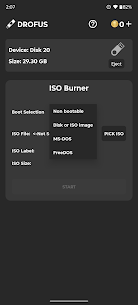
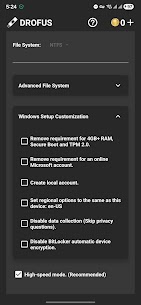
🧨 Core Features Supported Image Types • Burn ISO, DMG, and IMG files directly to USB • Compatible with: – Windows 7, 8, 8.1, 10, 11 – FreeDOS / MS-DOS – Non-bootable formats – Modern GNU/Linux distributions released after 2010 (such as Ubuntu, Fedora, Debian, Arch, and more) – macOS DMG (Intel-based only) – Raspberry Pi OS and other ARM-based images Windows ISO Handling • Manual selection of partition scheme and file system – GPT (UEFI) or MBR (Legacy BIOS) – NTFS or FAT32 • Bypass Windows 11 minimum requirements • Automated Windows setup customization (Win10/11) • Split large install.wim files for FAT32 compatibility • Works with official Microsoft ISOs without any modification Other Image Types • Linux, macOS DMG, and Raspberry Pi images are written as raw blocks – No customization or partition changes – Keeps the original layout and boot structure USB Compatibility • Works with USB flash drives, SD card adapters, and external SSDs • OTG support required • Root access is only needed for the internal SD slot
💰 Coin Usage Coins unlock advanced image types and formats. You can earn coins by watching rewarded ads or purchase them directly. Actions that require coins: • Burn Windows ISO → 2 coins • FreeDOS / MS-DOS → 1 coin • Non-bootable formats → 1 coin
Free actions: • Burn Linux ISOs, Raspberry Pi images, and macOS DMG files • Write raw blocks without customization • Use all manual configuration tools for supported formats
📢 Ad-Supported Experience DROFUS includes banner ads and rewarded video ads so the core features stay free. Upgrade to Pro to: • Remove all ads • Get unlimited access • Turn off the coin system • Use the app offline or alongside ad blockers
⚠️ Technical Notes • Internet connection required unless you have Pro • Disable ad blockers unless you have Pro • Keep the app in the foreground during USB operations
Download DROFUS now and burn smarter, right from your Android device.
Developer's apps
Ultimate USB 12.3.3 MixApplications 80 MB Pro Unlocked ChaoMe Theme Editor MOD APK (Pro Unlocked) 1.8.37 MixApplications 106M
Related apps
SmartCookieWeb 17.0-beta3 SmartCookieWeb 5.40 MB No Ads Aloha Browser 8.12.1 Aloha Mobile 151.42 MB Premium Unlocked Facemoji Emoji Keyboard Pro 3.6.8.4 Nexileap 39.99 MB Pro Unlocked Notifications archive 1.6.10 Difer 9.25 MB Premium Unlocked Ice Box – Apps freezer 3.30.14 G Ruoxin He 16.44 MB Pro Unlocked
How to install
- Download the APK file above to your phone.
- Allow “Install unknown apps” when prompted.
- Open the downloaded APK and tap Install.
- If the package includes OBB/XAPK data, follow the bundled instructions.
MOD APKs are modified builds, so Play Protect may show a warning. Install only if you trust the file; use at your own risk.