

Screenshots
Description
Easy Cleaner – Clear Cache Mod Apk
Boost your device performance and safeguard your personal data with Clear Cache by Easy Cleaner available on GameMod.dev. When your phone starts to lag or run slowly, this utility helps reclaim valuable storage space and extends battery longevity.
The primary capabilities of Clear Cache encompass a cache cleaner, junk remover, bulky file manager, and photo organizer, alongside a convenient app uninstaller.
Core Features –
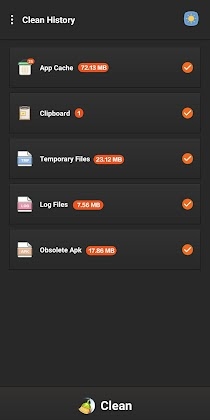
Cache Cleaner
Wipe all application caches with a single tap
Junk Cleaner
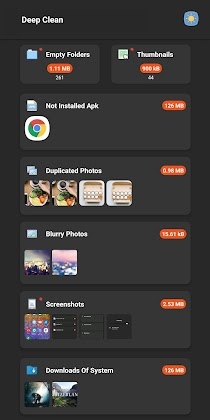
An intelligent junk removal engine performs a deep sweep of residual logs and empty folders.
Photo cleaner
Smart photo analysis helps pinpoint duplicate or low-resolution images.
Automatically select the superior shot within a series of similar photos
Screenshots cleaner
Large File Cleaner
Handle oversized files exceeding 10MB effortlessly
Sort bulky items by format, folder, or extension
Highlight newly discovered large files
Media Manager
Organize audio, video, and document files seamlessly
Cleaner
Clear out system downloads
Remove residual files left by third-party apps
Clear files transferred via Bluetooth
App Uninstaller
Perform batch uninstalls to recover device storage
Sort applications by file size to spot heavy apps
Quickly search to find specific apps
Plugin uninstaller detects and removes hidden applications
Clipboard Cleaner
Erase sensitive information from your clipboard history
Night Mode and Day Mode
Easily switch between day and night display modes to suit your preference.
This application leverages Android Accessibility services to deliver a smooth, effortless user experience.
Clear Cache is equipped with essential maintenance utilities, including junk and cache cleaners, storage and large-file removers, photo and media cleanup tools, a file manager, and an app uninstaller.
How to install
- Download the APK file above to your phone.
- Allow “Install unknown apps” when prompted.
- Open the downloaded APK and tap Install.
- If the package includes OBB/XAPK data, follow the bundled instructions.
MOD APKs are modified builds, so Play Protect may show a warning. Install only if you trust the file; use at your own risk.