

Screenshots

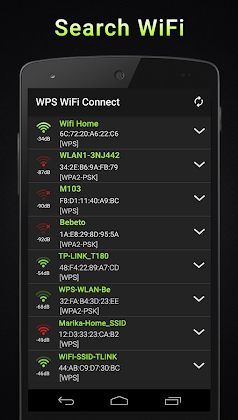
Description
WPS WiFi Connect MOD APK
With WPS WiFi Connect, evaluating your wireless access point's security through the WPS protocol is quick and simple. Wireless connections using WPS/WPA establish authentication via an 8-digit PIN, leaving various routers susceptible to exploitation through standard factory-set PINs.
WPS Connect Wifi- Wps Password Wifi Wps Router serves as an intuitive yet robust utility designed to identify WiFi passwords and assess potential WPS vulnerabilities.
WiFi WPS Connect-Wps router Password Wifi serves solely to inform network owners regarding potential security flaws in their wireless access points. Users bear full responsibility for any misuse of this tool.
The software integrates specialized PIN calculation algorithms, specifically easyboxPIN (ComputePIN) alongside the Zhao Chesung ("ComputePIN") implementation.
WPS: http://es.wikipedia.org/wiki/Wi-Fi_Protected_Setup
Should your network reveal security gaps related to the WPS standard, we strongly advise disabling WPS functionality on your wireless router immediately.
How Do These Applications Operate?
The process is straightforward: tap the Scan button to discover nearby wireless networks, then test your connection using the WPA standard or preconfigured default PINs.
Granting location access on your Android device is necessary for the WPS WiFi Connect app to scan nearby networks properly.
Should you encounter any errors or glitches while running WPA/WPS Connect, please share your feedback with us and introduce the application to your circle of friends.
How to install
- Download the APK file above to your phone.
- Allow “Install unknown apps” when prompted.
- Open the downloaded APK and tap Install.
- If the package includes OBB/XAPK data, follow the bundled instructions.
MOD APKs are modified builds, so Play Protect may show a warning. Install only if you trust the file; use at your own risk.