

Screenshots
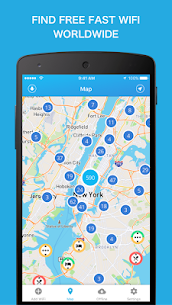



Description
Internet Speed Test EtralitySize
27 MBVersion
1.1.4Requirements
4.1Get it on
Report this app
Images
Mod Info
- Paid features unlocked
Description
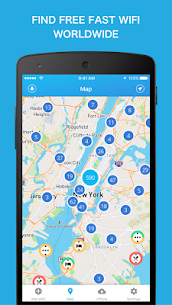
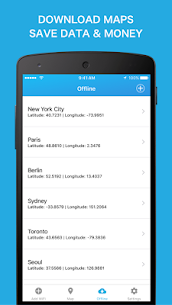
Get WiFi Finder to find Fast WiFi wherever you go. The offline functionality makes it possible to download places you are traveling to, so you can locate Fast WiFi anywhere. Most WiFi scanners are over crowded with outdated or private hotspots. Our WiFi Map contains only verified Hotspots. Hotspot information includes the type of venue and its speed.
Main Features:
✓ Look for WiFi Hotspots in you vicinity
✓ Find Fast WiFi anywhere in the World
✓ All Hotspots are verified and speed tested
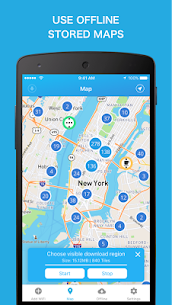
✓ Download Maps for Offline use while traveling (No internet connection needed)
✓ Filter WiFi Map by venue type: Hotel, Cafe, Restaurant, Bar, Store, etc.
✓ Works online as well as offline
Why our focus on WiFi Speed
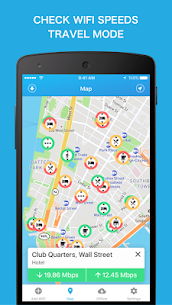
Many users think that passwords are the most important feature of a WiFi Database. Much more important is information about connection quality and internet speed. Nowadays passwords change frequently and are easily accessible once you are at the cafe, bar or restaurant. Especially in hotels, guests normally get an individual login key. If you have ever been on the hunt for a reliable WiFi connection you know how frustrating it can be to run to the next hotspot just to find out that the connection is too unstable to use. With our approach you are able to locate internet with the quality you need. Each spot shows you what the connection can be used for with easy to understand colour coded symbols of email, browsing, gaming, streaming or video chat.
Where are the Hotspots from:
The WiFi Finder is getting its data directly from SpeedSpots crowdsourced database of hundreds of thousands of WiFi Hotspots around the world. It is the only database that shows you WiFi rated by Hotspot Speed. With our Wi-Fi analyzer tools we obtain information about several important WiFi features:
✓ The stability and speed for download and upload in Mbps as well as the latency of the connection in ms. That way you can be sure the Wi-Fi is good enough for what you need.
✓ The Wi-Fi signal strength in dBm. This lets us estimate the stability of a connection, so your connection is not getting interrupted.
✓ The encryption type (None, WEP, WPA, WPA2). If you are concerned about hacking, this lets you know how secure the hotspot is.
✓ The usage charge (free or paid). Why pay for bad internet when there is a good connection right around the corner.
We take all of these factors into account when adding a Wi-Fi Hotspot on our map so you have the best experience possible.
More about SpeedSpot:
The SpeedSpot community, with more than 10 Million users, is one of the fastest growing wifi sharing community in the world. 100 thousands of tests are performed every day in our network on Edge, 2G, 3G, 4G, LTE and WiFi. This allows us to keep SpeedSpots up to date and add new ones frequently. Be part of our community and “share & locate” WiFi wherever you go.
Wi-Fi Connection Recommendations:
WiFi networks based on IEEE 802.11 standard come in 2.4 GHz and 5 GHz for the newer routers. We recommend our users to use the 5 GHz radio band (also sometimes called 5G in the SSID name). This WiFi band normally offers higher speeds especially in fast hotspots compared to its 2.4 GHz counterpart.
Related apps
Poke Genie 8.19.1 Poke Genie 107.92 MB OsmAnd+ 5.4.11 OsmAnd 372.45 MB OsmAnd Live AlpineQuest 2.4.1 Psyberia 7.91 MB Full Version Flightradar24 11.13.0 Flightradar24 AB 52.41 MB Gold Unlocked Quick Tatkal 26.10.5 Afre Studios 197.08 MB Premium UnlockedHow to install
- Download the APK file above to your phone.
- Allow “Install unknown apps” when prompted.
- Open the downloaded APK and tap Install.
- If the package includes OBB/XAPK data, follow the bundled instructions.
MOD APKs are modified builds, so Play Protect may show a warning. Install only if you trust the file; use at your own risk.