

Screenshots



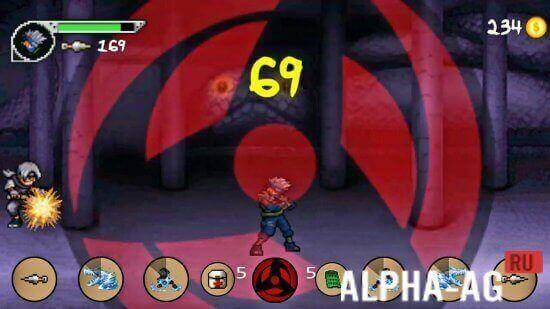



Description
Battle of Ninja Mod
Defend your village and its innocent inhabitants by teaming up with a guardian ninja to battle against waves of wicked monsters.
Gameplay
A fairytale village is under siege by malevolent creatures. Step into the shoes of a guardian ninja, repel the invaders, and secure the village. The game features a variety of combat arenas that unlock progressively as you clear numerous challenging stages.
Successfully finishing these stages rewards you with helpful bonuses and surprises designed to aid your struggle against the darkness.
Advancing through the levels consumes energy, which regenerates naturally over time or can be earned as a reward for completing specific objectives. At the start of each level, you can select three unique skills to utilize during combat.
Periodically, you will encounter an angel who restores your health. This assistance is crucial, as the enemies you face become progressively faster and more formidable with each passing level.
Game Features
Protect the village from monster attacks with your ninja skills. You get to pick new abilities before every fight, ensuring that every gameplay session feels unique and engaging.
Enhance your combat prowess by leveling up your skills and upgrading your gear, which is essential for taking down the final boss.
Enjoy intuitive controls and stunning visuals in a package that is well-optimized to run smoothly even on older mobile devices. Compete for high scores, unlock achievements, and compare your progress with friends on the leaderboard.
Dec 03 Additional information:
- Required Android version: 4.1 or higher
- Age rating: Everyone
- Russian language support: Not available
- OBB / Cache files: Not required
Version 2.2.1, Offline mode, GameMod.dev rating: 7/10, Similar titles: NARUTO X BORUTO NINJA VOLTAGE, LEGO Harry Potter: Years 5-7, NARUTO SHIPPUDEN: Ultimate Ninja Blazing, LEGO Ninjago Shadow of Ronin
Check out our video content!
Post a comment
How to install
- Download the APK file above to your phone.
- Allow “Install unknown apps” when prompted.
- Open the downloaded APK and tap Install.
- If the package includes OBB/XAPK data, follow the bundled instructions.
MOD APKs are modified builds, so Play Protect may show a warning. Install only if you trust the file; use at your own risk.