
Screenshots

Description
Download Game Turbo 4.0 Xiaomi APK Latest Version for Android (Updated: 12/05/2022)
Additional App Information
| App Name | Game Turbo |
| Publisher | Xiaomi |
| Latest Version | v4.0 |
| Operating System Requirement | Android varies with device |
| Size | Around 58MB |
| Category | Tools |
| Features | Game booster, voice changer, built-in screen recorder, network accelerator… |
| Price | Free on GameMod.dev |
Download APK from GameMod.dev
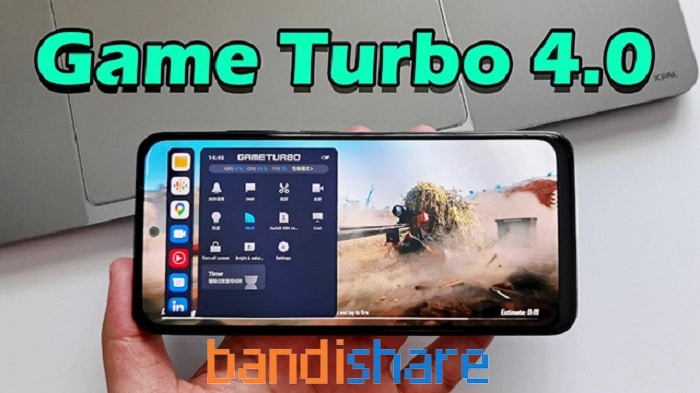
Game Turbo 4.0 APK is an exceptional utility designed to elevate your mobile gaming performance and ensure a seamless gameplay experience. While most modern Xiaomi smartphones come with Game Turbo pre-installed, users of other Android devices can easily get the standalone Game Turbo 4.0 Xiaomi APK directly from GameMod.dev at zero cost.
About Xiaomi Game Turbo
Xiaomi Game Turbo serves as a specialized optimization toolkit engineered to enhance game stability and maximize your phone's performance. Packed with powerful capabilities, it lets you boost frame rates, transform your voice during live matches, and stabilize Wi-Fi connectivity. Its clean, intuitive layout makes navigating settings effortless, delivering an upgraded gaming experience on Android.
Key Features of Game Turbo 4.0
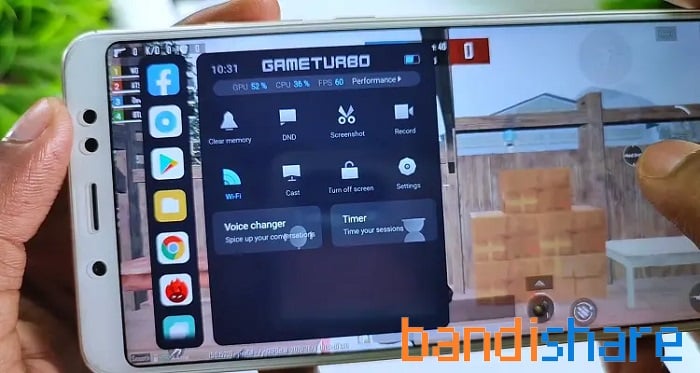
The updated Game Turbo 4.0 Xiaomi APK brings a popular real-time voice changer tailored for multiplayer titles, alongside an array of practical enhancements:
- Performance Booster: Optimizes hardware allocation to provide higher frame rates and reduce in-game lag.
- Quick-Access Floating Menu: Grants direct access to settings during gameplay; just pull down from the upper-left corner to reveal the overlay menu instantly.
- Player Feedback: Keeps you updated with relevant alerts and community gameplay insights while active in-game.
- Hide Added Games: Allows you to remove shortcut icons of games stored in Gamebox from the main home screen.
- Fast App Uninstaller: Cleanly removes installed games straight from the dashboard without navigating through device settings.
- Display Orientation Settings: Switch between portrait and landscape modes dynamically to match your current display preference.
- Home Screen Shortcut: Places a quick-launch icon directly on your main screen, letting you jump straight into the app without digging through system settings on devices that come with Game Turbo pre-installed.
- Performance Mode: This setting provides two major enhancements: Wi-Fi optimization to minimize ping and network lag, alongside touch control tuning that sharpens screen sensitivity and response times while gaming.
- Performance Optimization: Fine-tunes your CPU and GPU workloads to avoid thermal throttling and protect hardware integrity throughout marathon gaming sessions.
- Extra Memory: Allocates additional memory specifically for your games, expanding data handling capacity for a smoother mobile experience.
- Mi Wi-Fi Speed Boost: Boosts your wireless connection speeds by 10–20% whenever you are connected to compatible Mi or Redmi routers.
- Enhanced Experience: Disables distracting system functions mid-game, including automatic brightness adjustments, reading mode, screenshot gestures, and pull-down notification shades, ensuring completely uninterrupted gameplay.
- Key and Gesture Restriction: Locks hardware buttons and navigation gestures during play to eliminate unintended taps and costly mistakes.
- Additional Settings: Allows you to customize tactile feedback, tap responsiveness, continuous touch rates, and dead zones to prevent misclicks.
- Access Facebook and Messenger seamlessly without leaving your game.
- Record in-game action smoothly to capture your finest moments.
How to Change Your Voice in PUBG Using Game Turbo 4.0
If you want to alter your voice with the Game Turbo voice changer APK to surprise friends in PUBG or other online mobile titles, follow this easy step-by-step walkthrough using Xiaomi Game Turbo:
Step 1: Download and complete the installation of the Game Turbo 4.0 Vietnamese app on your Android handset.
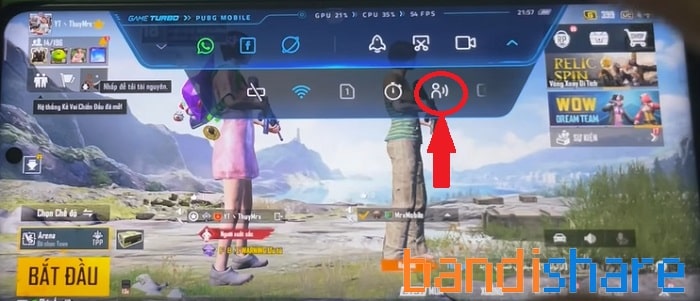
Step 2: Launch PUBG, swipe down from the upper edge of your screen to open the Game Turbo overlay, and tap the avatar icon to open the voice modifier.
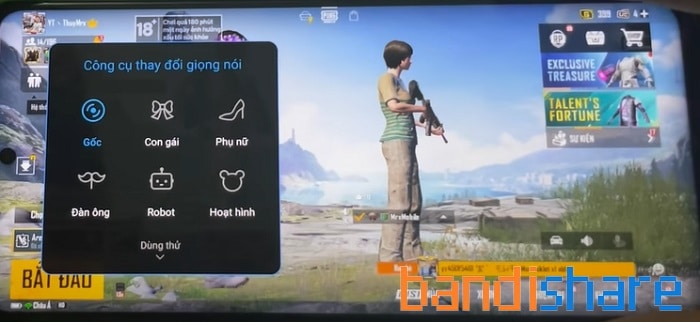
Step 3: Browse the voice changer toolkit and pick your desired sound preset: Girl, woman, man, Robot, cartoon. Once picked, the filter activates instantly.
>> Note: Ensure your in-game microphone is enabled so squadmates can hear the modified audio clearly!
Pros and Cons of Xiaomi Game Turbo
| Pros | Cons |
|
|
Conclusion: Overall, Xiaomi Game Turbo serves as an exceptional utility to maximize performance and elevate your handheld gameplay. While initially integrated into Xiaomi smartphones, users can also install this standalone APK V4.0 release across other Android hardware at no cost directly via GameMod.dev.
Read More
Download
Verified Safe
Shared by: GameMod.dev
Related Posts
How to install
- Download the APK file above to your phone.
- Allow “Install unknown apps” when prompted.
- Open the downloaded APK and tap Install.
- If the package includes OBB/XAPK data, follow the bundled instructions.
MOD APKs are modified builds, so Play Protect may show a warning. Install only if you trust the file; use at your own risk.