

Screenshots




Description
- Home /
- Apps
Signature Maker: Digital Sign MOD APK (Premium Unlocked) 4.0.2
- Apps
- Tools
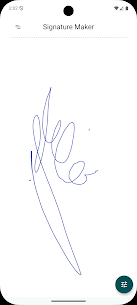
Skip the printing, signing and scanning routine with Signature Maker, a lifelike and efficient app for creating your electronic signature. Sketch your signature on screen with a finger or stylus and get a sharp, high-definition result in seconds. TELEGRAM Report Developer Raúl R. Size 5 MB Version 4.0.2 Requirements 8.0 Get it on
- Telegram
Report this app
Images
Mod Info
- Premium Unlocked
Description
No more printing, signing and scanning documents by hand. Signature Maker takes care of it all.
Features
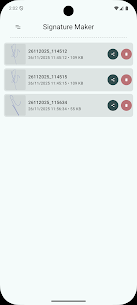
• Sign documents 🖋️ • Millions of colors 🖋️ • Multiple stroke styles 🖋️ • Custom background 🎨 • Save your signatures 💿 • Send or delete any signature 📧 • Share your signature 📧 • Custom path 🔨 • Ads can be turned off completely for free 💪 • User-friendly interface 😍 • Responsive layout (adapted for tablets) 😍 • Free 😍 • Open source 😍
How does it work?
❶ Pick a color. ❷ Choose a stroke style. ❸ Sign with your finger or stylus. ❹ Save it and send it anywhere (Drive, Dropbox, Telegram, WhatsApp, Gmail, Hangouts and more).
ALL DONE!
Simply download your digital signature and attach it to any file (PDF, Word and so on).
Signature Maker is a full-featured signature creator and manager. It saves your signature as a transparent image that you can add to any digital document.
Make your own stylus
Materials:
❶ A pencil. ❷ Aluminum foil.
Procedure:
Wrap the pencil in aluminum foil so that your finger, the pencil and the screen make contact.
Here is the new version of the best signature app: SIGNATURE MAKER! It comes with a completely redesigned look, and we have incorporated many of your suggestions along with several requested options. The app is now open source under the GNU GPL v3.0 license. Why wait? Download the new version today. Signature Maker is clean and completely free.
Signature Maker is a free, open-source app hosted on GitHub and released under the GNU GPL v3.0 license. If you'd like to explore the project, you can check it out here:
https://github.com/rulogarcillan/SignatureMaker
Related apps
Insget 3.14.4 Spaple 88.09 MB Premium Unlocked Poke Genie 8.19.1 Poke Genie 107.92 MB NekoBox+ 1.4.2-101 NekoBox+ 159.46 MB No Ads Inure App Manager build107.3.0 Hamza Rizwan 25.96 MB Premium Unlocked SmartCookieWeb 17.0-beta3 SmartCookieWeb 5.40 MB No Ads
How to install
- Download the APK file above to your phone.
- Allow “Install unknown apps” when prompted.
- Open the downloaded APK and tap Install.
- If the package includes OBB/XAPK data, follow the bundled instructions.
MOD APKs are modified builds, so Play Protect may show a warning. Install only if you trust the file; use at your own risk.