

Screenshots



Description
- Home /
- Apps /
- Tools
Samsung Voice Recorder 21.5.86.90
- Tools
Samsung Voice Recorder delivers a smooth, premium audio capturing experience with crystal-clear sound, accompanied by versatile editing and playback tools. Developer: Samsung Electronics Co. Ltd. | Size: 45 MB | Version: 21.5.86.90 | Requirements: Varies with device | Package Type: Original APK
- Telegram
Report App
Screenshots
Overview
Engineered for seamless usability, Samsung Voice Recorder captures top-quality audio while giving you full control over playback and file editing.
Samsung Voice Recorder: Everything You Need to Know
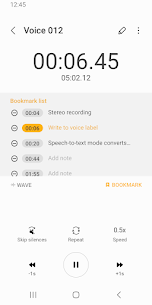
Samsung Voice Recorder is a flexible audio capture tool built to handle virtually any sound recording task. Whether you need a quick voice memo or want to capture a long interview, the app pairs an accessible interface with reliable, high-grade functionality. In this walkthrough, we examine its standout features, available capture profiles, and built-in post-production tools.
Core Highlights and Capabilities
- Crystal-Clear Audio Quality: Record pristine sound tracks powered by advanced audio processing from Samsung Voice Recorder.
- User-Friendly Design: A clean, uncluttered layout ensures seamless navigation and effortless operation right from the start.
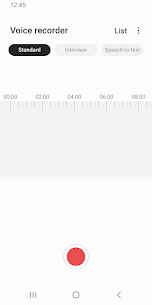
- Multiple Recording Modes: Switch between tailored modes—such as standard audio, two-way interview, and voice memo—to match any recording situation.
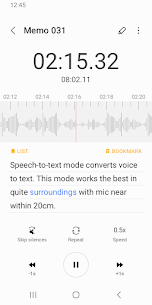
- Built-in Speech-to-Text (STT): Automatically transcribe spoken memos into editable text, helping you search and reference notes in seconds.
- NFC Tag Support: Link specific sound clips to NFC tags for instant, one-tap playback.
- Handy Editing Suite: Trim, rename, organize, and share your captured tracks with minimal effort.
- Background Audio Capture: Keep your recording sessions active even while running other applications on your device.
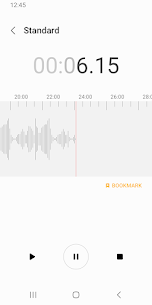
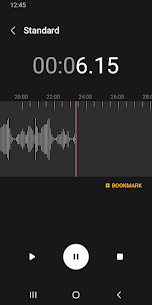
- Audio Bookmarking: Place markers on key moments in your audio files for quick navigation later on.
Available Recording Profiles
Samsung Voice Recorder comes equipped with three main recording configurations:
-
Standard Mode:
- A clean, distraction-free interface for everyday audio capture.
- Great choice for everyday sound capture and voice notes.
-
Interview Mode:
- Engages both microphones simultaneously to pick up clear sound from both participants.
- Shows split dual waveforms on-screen for straightforward audio monitoring.
- An excellent setup for recording lectures, conferences, and sit-down discussions.
-
Voice Memo Mode:
- Captures spoken words and instantly transcribes them into written text on the fly.
- Handy for quick note-taking, drafting emails via dictation, or generating instant transcripts.
Before Recording
Prior to starting a session, you have full control over these preferences:
- Directory Path: Select where your audio files are saved, whether on your device's internal storage or an external SD card.
During Recording
While an active recording is underway, you can take advantage of these features:
- Reject Incoming Calls: Block unexpected phone calls to avoid disruptions during critical audio captures.
- Bookmark Important Sections: Flag key timestamps throughout your track for effortless navigation later.
- Background Recording: Keep capturing clear audio seamlessly while multitasking across different apps.
Post-Recording Options
After wrapping up your session, take advantage of several handy management tools:
- Playback and Editing:
- Listen back to your captured tracks directly with the integrated audio player.
- Fine-tune playback rate, bypass silent pauses automatically, and loop audio segments.
- Organize your library by renaming tracks, removing unwanted files, or attaching custom voice tags.
- Sharing:
- Easily distribute your files to colleagues and friends via social networks, cloud storage, messaging tools, or email.
- NFC Tag Integration:
- Link specific audio clips to NFC tags for one-tap, instant playback.
Conclusion
Samsung Voice Recorder stands out as a flexible, feature-packed sound utility tailored to boost both daily productivity and creative projects. Ideal for students, content creators, and working professionals alike, it delivers everything essential for high-fidelity audio capture. With its intuitive setup, distinct operating modes, and comprehensive editing tools, you can easily get top-tier results out of every recording session right here on GameMod.dev.
More from Developer
Samsung Internet Browser 30.0.2.61 Samsung Electronics Co. Ltd. 300 MB Original Samsung Notes 4.4.29.23 Samsung Electronics Co. Ltd. 180 MB Samsung Music MOD APK (All Android Device) 16.2.42.0 Samsung Electronics Co. Ltd. 25 MB Samsung Health 6.32.0.001 Samsung Electronics Co. Ltd. 300 MB Samsung Email 6.2.13.1 Samsung Electronics Co. Ltd. 60 MB
Similar Applications
NTFS Reader 2.3.2 Stephen Kingston 4.94 MB Premium Unlocked Lantern 10.0.3 Brave New Software Project Inc 46.71 MB Pro Unlocked MCPEDL for Minecraft 2.4.5 Overwolf Ltd 47.27 MB No Ads YTDLnis Downloader 1.9.1 Denis Çerri 208.12 MB No Ads Ruler 10.0-release NixGame 15.89 MB Premium Unlocked
How to install
- Download the APK file above to your phone.
- Allow “Install unknown apps” when prompted.
- Open the downloaded APK and tap Install.
- If the package includes OBB/XAPK data, follow the bundled instructions.
MOD APKs are modified builds, so Play Protect may show a warning. Install only if you trust the file; use at your own risk.