
Screenshots
Description
Remix Theme for LG V30 & LG G6 Mod APK
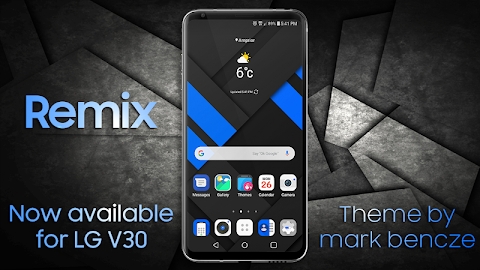
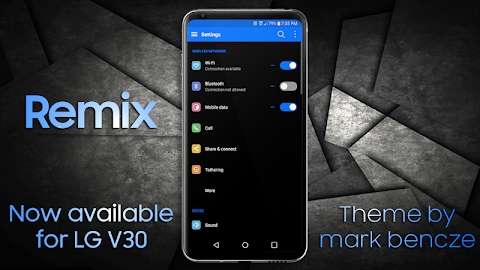
Introducing Remix: completely redesigned, cleaner, polished, and significantly enhanced! Specifically tailored for the LG V30 and LG G6, this personalized theme requires no root access whatsoever. You can effortlessly enable it by navigating to Settings > Themes.
It packs more than 30 custom overlays, complete with redesigned app icons and matching backdrops for unthemed applications.
Compatibility is strictly limited to the LG V30 and LG G6. Installing this on any unsupported or non-LG handset will void refund eligibility.
Ensure your screen resolution stays set to high. Running lower than QHD is not advised or supported. Compatibility relies on LG UX 6 and UX 6+. For those wondering, a backport to UX 5 is not planned due to platform constraints.
Enjoy full compatibility with Theme Ready applications. Because LG natively restricts third-party theming, specific apps have been customized to allow seamless styling. Explore the LG Themes Collection link under the developer section below and look up Theme Ready releases. Simply install those versions and apply this theme; the modified apps will skin properly without breaking stock styles, altering other themes, or slowing down your device.
Crafted for native LG system software, Remix delivers a sleek, modern visual refresh. It builds upon familiar Material Design elements with stylish flair, pairing deep dark backgrounds with crisp blue accents and vibrant iconography.
Using the default LG home launcher is strongly advised. Alternative third-party launchers may experience glitches when styling icons or handling dynamic elements, which cannot be fixed on our end.
Whenever you install an update, just reapply the theme in your settings to refresh everything!
Themed System Applications:
~System Framework
LG Alarm Clock
LG Backup
LG Web Browser (subject to carrier availability; omitted by certain providers)
LG Calendar
LG Camera
LG Contacts
Google Contacts & Google Phone (Theme Ready release required)
Exclusive to V30 (unsupported on the G6 due to system limitations)
~LG EasyHome Launcher
LG Email
LG File Manager
LG FM Radio
LG Gallery
~LG Hi-Fi Recorder
Default Home Launcher
LG Messages
LG Music
LG Phone
LG Keyboard
LG In-Call Screen Interface
LG Quick Memo App
~LG Quick Voice Plus Feature
LG System Settings
LG SmartShare Cloud Storage
LG System UI Interface
~LG TV Application (Network Carrier Specific)
Official LG Update Center
~LG Voice Recording Tool
Live Weather Forecast Display –
Feel free to reach out if you run into any issues so I can assist you.
Technical support cannot be provided to devices with customized or rooted systems. Third-party modifications may introduce unpredictable issues and jeopardize overall device stability.
How to install
- Download the APK file above to your phone.
- Allow “Install unknown apps” when prompted.
- Open the downloaded APK and tap Install.
- If the package includes OBB/XAPK data, follow the bundled instructions.
MOD APKs are modified builds, so Play Protect may show a warning. Install only if you trust the file; use at your own risk.