
Screenshots

Description
Annoying Sound
This application emits extremely irritating, grating audio tones across multiple frequency levels.
Key Features
Operating with complete simplicity, the utility creates soundwaves spanning an oscillation spectrum from 200 Hz up to 20,000 Hz.
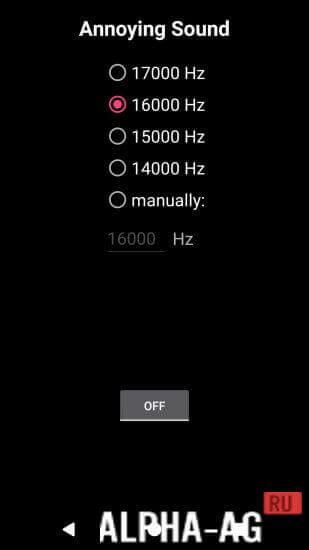
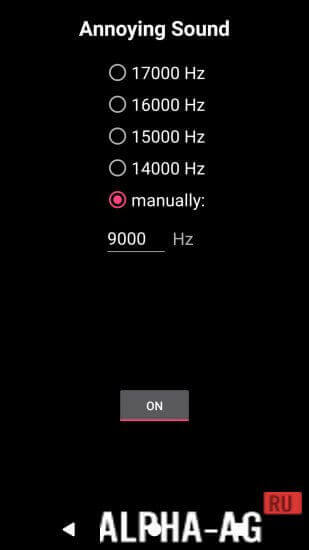
Listeners can either pick ready-made harsh tones ranging between 13,000 Hz and 18,000 Hz or fine-tune custom numeric rates manually.
You can start or pause the tone using a toggle placed just under the center of the interface. Once activated, the tone synthesizer continuously outputs waves at your chosen frequency. Notably, these piercing noises bother both humans and pets alike.
Whenever you like, adjust the frequency parameters manually to maximize the annoyance factor. Dialing in higher settings produces a sharp, piercing whine, whereas lower ranges generate a deep, droning hum. The app bundles an extensive library of the most obnoxious sound effects known.
Certain noises are added purely for practical jokes, while others correspond to scientifically documented tones known to irritate human hearing. Any chosen track can effortlessly be assigned as a loud ringtone so you never skip incoming calls. Alternatively, assign them to incoming alerts or use them as a wake-up alarm that is guaranteed to pull you out of bed immediately. No complicated setup is needed, saving you from navigating endless config menus.
You can get the full "Annoying Sound" APK for Android at no cost directly on GameMod.dev.
Updated: November 20 | App Details:
- Android Version: 4.3 or higher
- Content Rating: 3+
- Russian Language: No
- OBB / Data: Not required
Version: 4.9.5 | Editor Rating: 8/10 | Related Apps: Change Your Face, VKMP, White Noise, Voice Changer | Follow Us
Join our official YouTube channel!
Post a Comment
How to install
- Download the APK file above to your phone.
- Allow “Install unknown apps” when prompted.
- Open the downloaded APK and tap Install.
- If the package includes OBB/XAPK data, follow the bundled instructions.
MOD APKs are modified builds, so Play Protect may show a warning. Install only if you trust the file; use at your own risk.