

Screenshots
Description
PSOL Launcher – Pixel Style Omni Launcher MOD APK
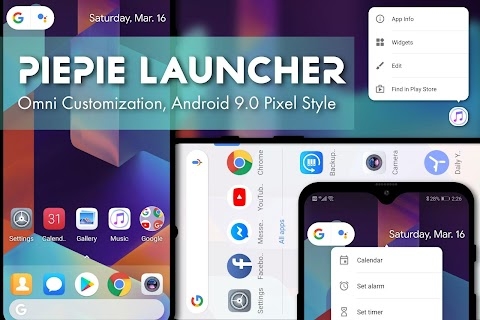
PSOL Launcher brings the clean look of Android 9.0 and 10.0 Pixel interfaces to your device, packed with deep customization options and handy tools to boost productivity and personalize your home screen.
Designed around the Pixel aesthetic, this launcher lets you pull up the full-screen app drawer right from the dock, tweak dock colors, and display the Google Pill or Date widgets. It covers Android 6.0 through 9.0 design elements with Android P (9.0) enabled out of the box. Switch looks anytime via Settings > Quick Settings.
Helpful Tips & Tricks
To open the settings panel, simply tap and hold an empty spot on your home screen or select the launcher icon directly.
Quick advice for beginners: if you want a clean, effortless Pixel setup without tinkering with endless options, you are in the right place.
Limitless Personalization Options
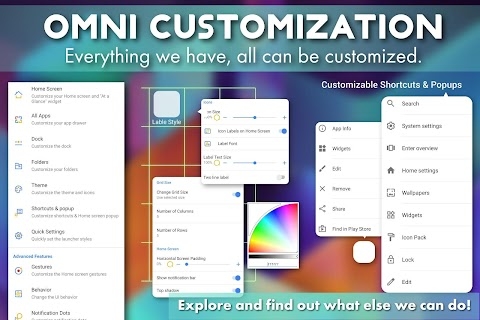
1. Home Screen: Adjust icon dimensions, grid layouts, label typography, and toggle the status bar visibility according to your preference.
2. Transition Effects: Experiment with 14 distinct scrolling animations, fine-tuning fade-ins and elastic bounce levels until you find the perfect look.
3. At a Glance Widget: Tailor clock fonts, time layouts, search bar designs, and additional widget details.
4. App Drawer: Personalize drawer arrangements, icon scaling, label designs, and top search bar aesthetics.
5. Dock Customization: Configure your dock's height, icon labels, page indicators, and curved corners.
6. Folders: Personalize folder dimensions, pop-up animations, background transparency, accent shades, corner rounding, and icon sizes.
7. Visual Themes: Pick from 6 preloaded themes or let dynamic theming match the color tones of your active wallpaper.
8. Icon Packs: Easily apply custom icon packages and reshape icons. Restart the launcher afterwards via Settings > About PSOL Launcher > Restart to ensure changes take effect.
9. Context Popups: Style shortcut menus, modify text typography, extract color accents directly from app icons, and adjust corner radiuses.
10. System Behavior: Take control of device interactions, including orientation switching, screen rotation, and home screen lock rules.
11. Quick Reset: Revert all your tweaks in one tap if you want a fresh start via Settings > Backup and Recovery > Reset to Defaults.
Smooth, Fast, and Battery-Friendly
1. Gesture Controls: Make use of 7 responsive touch gestures (such as double-tapping or single-finger swipes) to quickly launch over a dozen apps.
2. Shortcuts & Menus: Tailor contextual menus and quick shortcuts to launch frequent apps and execute tasks much faster via the settings menu.
3. Battery Optimized: Engine-level optimizations deliver fluid navigation while reducing battery drain on everyday tasks.
Helpful Shortcuts
1. Open Calendar, Set Alarm, or Start Timer directly by tapping the At a Glance widget (enable this feature in Home Screen Settings).
2. Press and hold the At a Glance widget to immediately bring up the Clock app.
3. Tap the search bar inside the app drawer to reach Google Assistant, hidden applications, and the Play Store. Customize these shortcuts in Settings > All App Settings > Search Bar Settings > Buttons.
4. Lock your phone instantly by double-tapping anywhere on an empty part of the home screen.
5. Press and hold an application icon to reveal action menus like Share or View in Google Play Store, fully customizable in Shortcut Settings.
6. Long-press on an empty area of the screen to open quick-access shortcuts for System Settings, Icon Packs, Screen Lock, and layout editing.
Secure and Dependable
1. Hide Apps
2. Kids Mode
3. Backup & Restore Data
Theme Store
1. Icon Packs: Keep in mind that these are separate third-party packages directing to the Google Play Store. A handful are available at no cost, though the majority require payment.
2. Wallpapers
Android™ is a registered trademark owned by Google LLC. While PSOL Launcher draws inspiration from the native Android 9.0 Launcher experience, it is an independent utility and not officially affiliated with Google.
Device Administrator permission is required by this launcher to enable the screen lock feature.
How to install
- Download the APK file above to your phone.
- Allow “Install unknown apps” when prompted.
- Open the downloaded APK and tap Install.
- If the package includes OBB/XAPK data, follow the bundled instructions.
MOD APKs are modified builds, so Play Protect may show a warning. Install only if you trust the file; use at your own risk.