
Screenshots
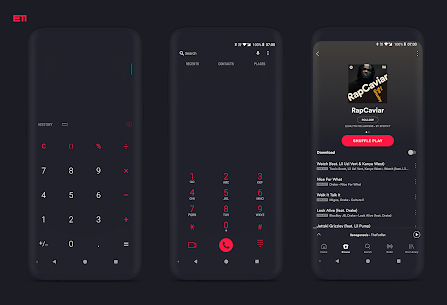
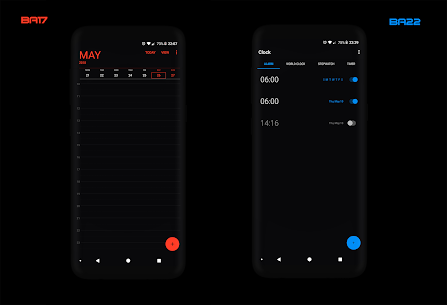


Description
- Home /
- Apps
PitchBlack S╶ Samsung Substratum Theme APK (Full Version) 36.1
- Pricing
- Apps
- Personalization
Give your Samsung smartphone a sleek, minimalist overhaul with PitchBlack S Samsung Substratum Theme, offering vivid accents and deep blacks. Developer: altankrk | Size: 49 MB | Version: 36.1 | OS: Android 7.0+
- Telegram
Report App
Screenshots
MOD Info
- Full Version Unlocked
Overview
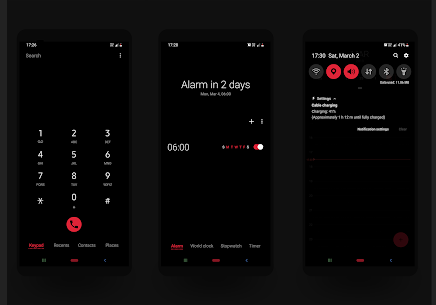
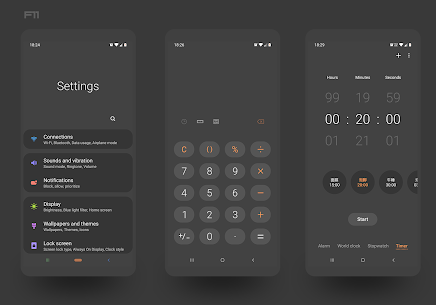
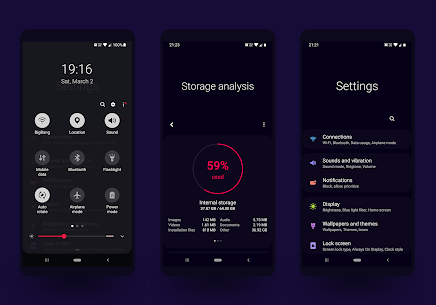
Pitchblack S combines sleek material aesthetics with an ultra-minimalist philosophy, featuring bold accent colors on top of pitch-black surfaces. Designed specifically to take full advantage of AMOLED displays, this battery-saving theme lets you select your preferred dark or true-black canvas alongside striking color contrasts.
Important: This theme is designed exclusively for Samsung handsets running Android Oreo and Android Pie (One UI).
You must have the Substratum theme engine properly set up to apply this theme.
Curated Themes & App Overlays
Pitchblack S includes beautifully pre-configured style sets, each matching a distinct accent shade with a clean dark background.
Packed with over 130 theme presets and 160+ HD dark-themed application overlays.
Compatible Operating Systems: • Samsung One UI running Android Pie (compatible via Root or Synergy) • Samsung Android Oreo 8.0/8.1
How to Install
• Turn on your device's native Dark Mode if you are using One UI • Open the Substratum app • Choose the PitchBlack S tile • Pick your current Android firmware version • Mark all checkboxes and customize the overlay options as desired (be sure to include core system packages like Settings, Android System, and SystemUI) • Select 'Build & Update' • Wait until all overlays finish installing and are fully activated • Restart your phone to apply the changes
Please Note:
If you encounter any bugs or difficulties, reach out directly via email at [email protected]
Frequently Asked Questions
Q: What apps receive custom themes?
A: Below is the catalog of supported apps with custom themes:
https://gist.github.com/westcripp/402154af211899f1b5c80b16dce56a24
Q: Do I need root access to use this?
A: Not at all. Starting with Android Oreo, the Substratum team introduced a rootless solution powered by an add-on called Andromeda.
Q: How do I set up and use Andromeda?
• First, download the Andromeda PC client to your computer. • Next, install Andromeda from the Play Store and turn on USB Debugging in Developer Options on your phone. • Open the Andromeda app on your Android device, plug it into your computer with a USB cable, and run the desktop client.
Q: Can Andromeda be used without a PC?
A: Yes, simply turn on Sungtromeda mode within Substratum settings. This activates a legacy mode similar to Substratum on Samsung Nougat, allowing you to install overlays manually.
• To learn more details about Andromeda desktop clients, visit https://forum.xda-developers.com/apps/substratum/andromeda-desktop-clients-release-notes-t3668682
Q: What should I do if my phone is already rooted?
A: Rooted devices do not require Andromeda at all—simply install Substratum and apply your preferred theme directly.
Q: Why do some overlays appear installed when they are actually missing?
A: Turn on Sungtromeda mode to identify any missing overlays, then proceed to install them manually.
Q: What steps should I take when the theme receives an update?
A: Update to the latest theme release, then build and enable the overlays again.
Q: What should I do if an app crashes after receiving an update?
A: Simply rebuild and apply the corresponding overlay, then restart your device.
Q: How can I fix a bootloop on my phone?
• Boot your device into Safe Mode and remove the installed overlays. • Alternatively, delete the overlays via ADB using the Andromeda client directory.
More From Developer
PitchBlack – Substratum Theme APK (Full Version) 89.9 altankrk 50 MB
Similar Applications
AlineT: bold linear icon pack 3.5.3 One4Studio 47.07 MB Full Version Caelus: linear icon pack 5.4.3 One4Studio 38.64 MB Full Version Minimal Widgets 2.2.11 JustNewDesigns 14.61 MB Premium Unlocked Caelus Duotone Icon Pack 5.4.3 One4Studio 43.53 MB Full Version Hera Icon Pack: Circle Icons 7.3.8 One4Studio 55.86 MB Full Version
How to install
- Download the APK file above to your phone.
- Allow “Install unknown apps” when prompted.
- Open the downloaded APK and tap Install.
- If the package includes OBB/XAPK data, follow the bundled instructions.
MOD APKs are modified builds, so Play Protect may show a warning. Install only if you trust the file; use at your own risk.