

Screenshots

Description
Minimal Skin KLWP 2017.Dec.18.18 APK is a sleek Personalization app crafted for Android devices.
Grab the latest version of Minimal Skin KLWP APK for Android via our direct download link on GameMod.dev.
Created by developer dfcwolf, Minimal Skin KLWP is a stylish Android personalization theme featuring a clean two-page layout designed to elevate your home screen.
Please note that this is not an independent app; you must install Kustom Live Wallpaper (KLWP) along with its Pro Key before applying it.
Requirements and Setup Guide
1. Install Kustom Live Wallpaper (KLWP) together with the KLWP Pro Key from the Play Store. 2. Use a compatible Android launcher—Nova Launcher is highly recommended (make sure to turn off the launcher dock). 3. Download the Modern skin for KLWP Collection. 4. Launch KLWP editor, tap the menu button in the top-left corner, and choose "Load Preset". 5. Head over to the "Installed" tab, locate Modern skin for KLWP Collection, and select your preferred preset. 6. Tap the disk/save icon in the top-right corner, apply it as your active wallpaper, and grant any necessary notification permissions. 7. For the cleanest visual aesthetic, remove external widgets and app icons from your desktop so they don't overlap the preset. That wraps up the installation; feel free to reach out via email if you need extra support.
Theme Overview
Comes with 1 complete minimal skin theme.
Page 1 – Clean minimal backdrop – current time – 4 black circular shortcuts: Dot 1: Viber (turns red for unread chats), Dot 2: Text Messages (turns red for unread SMS), Dot 3: Email (turns red for unread mail), Dot 4: Phone (turns red for missed calls).
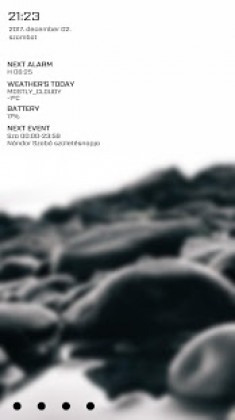
Page 2 – Elegant blurred background – clock, calendar date, and day of the week – upcoming alarm – today's weather forecast – battery level indicator (glows red below 20%) – scheduled agenda item.
Minimal Skin KLWP APK
Minimal Skin KLWP APK
What's New: Added an extra background.
How to install
- Download the APK file above to your phone.
- Allow “Install unknown apps” when prompted.
- Open the downloaded APK and tap Install.
- If the package includes OBB/XAPK data, follow the bundled instructions.
MOD APKs are modified builds, so Play Protect may show a warning. Install only if you trust the file; use at your own risk.