
Screenshots





Description
- Home /
- Apps
MePlayer Movie Pro 11.3.298
- Paid
- Apps
- Education
Master English through your favorite films with MePlayer Movie Pro, featuring an intuitive portrait mode for effortless subtitle reading. Developer: 미소프트 | Size: 6 MB | Version: 11.3.298 | Requires: Android 4.4+
- Telegram
Report App
Screenshots
MOD Info
- Full Unlocked
Overview
MePlayer Movie Pro – Master English while enjoying your favorite films! Watch clips vertically to read complete subtitle transcripts and view playback simultaneously. Built for language learners, this dedicated video player offers full support for SMI and SRT caption files.
Improve Your English with Movies!
Vertical playback lets you view video scenes and follow the subtitle text at the same time.
MePlayer Movie serves as a specialized video player for language acquisition, fully compatible with SMI and SRT captions.
Easily browse the entire transcript by scrolling to practice English while watching, and tap any unfamiliar term to open an instant dictionary lookup.
Accelerate your language learning effortlessly using smart auto-replay and targeted repetition tools during playback.
Beyond study features, it functions smoothly as a versatile daily media player for all your entertainment needs.
Setup Before Playback
Place both your video file and matching subtitle file into the same folder on your storage. Common supported containers include MP4 and AVI, provided your device decodes them natively. For optimal performance without stuttering, MP4 encoding is recommended. Ensure subtitle tracks are formatted in SMI or SRT.
How to Use
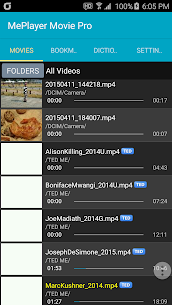
- Launch MePlayer Movie and pick the media title you wish to stream from your playlist.
- Playback Controls (Rewind, Play/Pause, Fast Forward): Use the on-screen control overlay during video playback. – Rewind: Jumps back to the beginning of the previous caption line. – Play/Pause: Opens the navigation and settings menu. – Fast Forward: Skips straight to the start of the upcoming subtitle line.
- Swipe through the transcript text to locate any line you want to review, then simply tap it to jump playback immediately to that timestamp.
- Sentence Replay: Loops the current line as many times as you configure. – Smart Replay: Dynamically adjusts repetitions based on how challenging the phrase is. – Segment Replay: Effortlessly loops specific sentence sections for focused learning.
- Pause & Repeat: Pauses playback automatically after every line so you can shadow the dialogue, rehearse your pronunciation, or read subtitles aloud. When TTS (Text-to-Speech) is turned on, your device will speak each subtitle line during intervals.
- Subtitle Language Selection: Seamlessly toggle between Korean, English, or bilingual display.
- Flexible Screen Orientation: Rotate effortlessly between vertical orientation and a full-screen horizontal layout for immersive movie watching.
- Background Audio Mode: Pressing back to exit the video player switches seamlessly to audio-only playback, transforming your film into an MP3 player experience.
- Integrated Dictionary: Tap any word right on the video or press and hold the text in the transcript below to bring up definitions. Choosing any term opens its full explanation in the dictionary. – Built-in Vocabulary List: Looked-up terms are neatly cataloged into your personal study list. – Quick Word Removal: Simply long-press saved terms to clear them. – Audio Pronunciation via TTS: Configure your phone's voice engine settings if audio playback is not working.
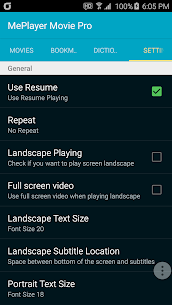
- Custom Settings: Fine-tune playback resumption, preferred dictionary sources, screen orientation defaults, and more.
- Playback Speed Adjustment: Available for MP4 videos on Android 6.0 and higher.
Key Features
. Support for SMI and SRT subtitles with real-time autoscrolling. . Intuitive one-tap controls: easily rewind, pause, play, or fast forward directly on the screen. . Subtitle-based jumping. . Standard, adaptive smart, and section-level phrase looping. . Automatic pause-and-repeat mode. . Comprehensive dictionary lookup powered by Google Dictionary across multiple world languages. . High-quality TTS voice playback for both subtitles and word definitions. . Automatic study list saved from your dictionary queries. . Seamless switching between portrait and landscape orientations. . Audio-only background playback (MP3 mode). . Smart bookmarking to resume right where you left off. . Uninterrupted playback support. . Subtitle synchronization adjustments. . Spoken subtitle audio powered by TTS. . Target phrase section looping. . Full integration with ColorDict.
More by This Developer
MePlayer Music 3.8.114 미소프트 13 MB
Recommended Apps
Poke Genie 8.19.1 Poke Genie 107.92 MB All Scanner: AI Identifier 1.9.40.1020 River Stone Tech 39.21 MB Premium Unlocked DSAlgo – Algorithms Visualizer 11.3 DSAlgo 16.59 MB Premium Unlocked Beelinguapp 3.295 Beelinguapp Languages 26.71 MB Premium Unlocked PictureThis 5.38.0 Glority Global Group Ltd. 90.15 MB Premium Unlocked
How to install
- Download the APK file above to your phone.
- Allow “Install unknown apps” when prompted.
- Open the downloaded APK and tap Install.
- If the package includes OBB/XAPK data, follow the bundled instructions.
MOD APKs are modified builds, so Play Protect may show a warning. Install only if you trust the file; use at your own risk.