
Screenshots
Description
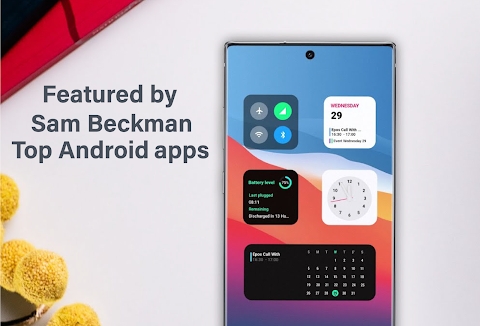
iOS Widgets for KWGT Mod Apk: Bring the sleek aesthetic of iOS to your Android device with this latest widget collection. You can currently enjoy 65 unique iOS-style widgets, with even more designs coming in future updates. Please note that this is not a standalone application and requires the KWGT PRO app to function.
Installation guide for iOS Widgets for KWGT
Download both the Card_widget app and the KWGT PRO app. Long-press on your home screen to add a new widget, choose the KWGT option, tap the placeholder on your screen to open the app, select the iOS widgets pack, and pick your favorite design.
Available widget categories
- Twitter widgets
- Weather widgets
- Control center widgets
- Calendar widgets
- Battery widgets
- Time widgets
- Fitness tracking widgets
- News widgets
- Gallery slideshow widget
- Notes widget
- Analog clock widgets
- World clock widget
- Nike NRC widget
- Large calendar widget
- App folder widgets
- Dock widgets
- Google widgets
- This pack includes 65 widgets available in both light and dark modes, with more additions arriving in every update.
For the best results, use a launcher that supports a grid width of at least 4 (such as a 9×4 layout). We recommend using Google Fit and Google Calendar to ensure the fitness and scheduling widgets display precise data. Functionality may be limited if you use alternative applications. You can easily hide or show widget labels by toggling the switch found within the Globals tab.
Analog clock widget
To ensure the second hand animates correctly, please navigate to your KWGT settings and change the update frequency to 'Fast' or 'One Second'.
Nike Running Widget
Make sure Google Fit is configured with your data; you will need to set your activity goals manually. Simply tap the widget to access the globals menu to adjust these settings. Other widgets in the pack follow the same customization process.
Control center
Due to technical constraints within KWGT, the control center widget can only toggle Wi-Fi and Bluetooth. Direct control for airplane mode and mobile data is not possible due to these inherent system limitations.
Fitness widget
To display your activity and fitness metrics, Google Fit must be installed. Although alternative services might function, complete compatibility has been tested and confirmed only with Google Fit.
Gallery Widget
Users have full control over the destination directory for stored images, along with the option to adjust the refresh interval down to 1 minute. If you prefer pointing to a different folder, simply update the global file path variable. Navigating through news updates is easy: tap the left or right edge of the picture to flip through articles, or select the headline to view the full story.
Widget Notes
Because of native KWGT constraints, note customization relies on global variables to set up Note 1 and Note 2. Tapping the orange section launches the KWGT editor so you can tweak these settings, whereas touching the white zone instantly launches Google Keep.
Dock Widget
This setup demands Nova Launcher or any alternative home launcher supporting widget overlap. Head into your desktop customization settings to turn on overlapping, then position your preferred app icons right over the dock widget.
How to install
- Download the APK file above to your phone.
- Allow “Install unknown apps” when prompted.
- Open the downloaded APK and tap Install.
- If the package includes OBB/XAPK data, follow the bundled instructions.
MOD APKs are modified builds, so Play Protect may show a warning. Install only if you trust the file; use at your own risk.