

Screenshots
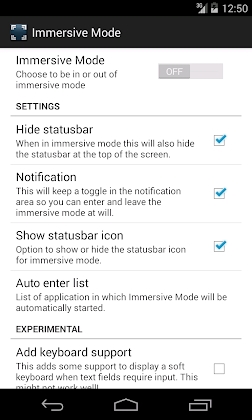
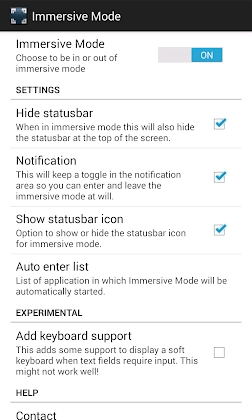
Description
Immersive Full-Screen Mode MOD APK
By granting Accessibility Services permission, you can activate true full-screen viewing and take advantage of your entire display area.
Important Notice:
Due to native Android constraints, the virtual keyboard cannot be used while immersive mode is active; however, you still enjoy uninterrupted screen real estate.
This utility lets you seamlessly toggle immersive mode on and off to reclaim every single pixel, cleanly tucking away the bottom navigation bar.
Key Features:
* Easily switch immersive mode on or off straight from the settings menu
* Toggle full-screen mode directly via the quick notification panel
Flexible controls over notification triggers, timing, and visibility
* Option to hide the upper status bar whenever needed
* Automatically trigger immersive mode for designated applications
* Built-in blacklist to exclude specific apps from launching in full screen
* Handy homescreen widget for one-tap mode switching
* Fully compatible with Tasker and Locale automation
* No root required! Functions immediately without any root access.
* Public Intent Actions for Automation
– be.ppareit.immersivemode.ACTION_ENTER_IMMERSIVEMODE
– be.ppareit.immersivemode.ACTION_LEAVE_IMMERSIVEMODE
– be.ppareit.immersivemode.ACTION_TOGGLE_IMMERSIVEMODE
You can incorporate these intents to configure custom automated actions
Known Issues:
* Keyboard availability is restricted in full-screen view. You may need to temporarily leave immersive mode to type in certain apps due to Android security measures.
A handful of applications—most frequently games—fail to toggle between regular and immersive states properly because they do not adhere to standard Android guidelines.
Support:
Reach out directly to the app developer for further inquiries or support.
How to install
- Download the APK file above to your phone.
- Allow “Install unknown apps” when prompted.
- Open the downloaded APK and tap Install.
- If the package includes OBB/XAPK data, follow the bundled instructions.
MOD APKs are modified builds, so Play Protect may show a warning. Install only if you trust the file; use at your own risk.