
Screenshots
Description
Hidey Hole (Wallpapers for Galaxy S10 Series) MOD APK
Hidey Hole is a dedicated wallpaper aggregator tailored specifically for Samsung Galaxy S10 lineup devices (S10, S10e, and S10+), curated around creative backgrounds that cleverly disguise or incorporate the camera cutout. Note that these designs are incompatible with other smartphones.
All available wallpapers are contributed directly by the community, meaning individual submissions fall outside the developer's personal control.
Additionally, the app features an intuitive interface.
Background updates automatically sync from the /r/S10wallpapers community hourly, alongside routine six-hour refreshes.
——————
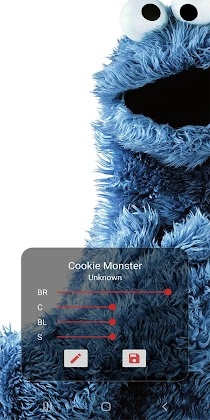
Grabbing an image and applying it to your background is effortless. You might ask why you need another customization tool, but the real power lies in the built-in fine-tuning options. Drop the brightness a bit for better icon visibility, or calibrate saturation, contrast, and black point levels to suit your display.
The distinctive punch-hole cutout on these flagships sparked the development of this utility. It was an exciting challenge to detect camera positions dynamically through software and adapt images across differing screen geometries. Because lens placements vary slightly across phone variants, using a graphic made for one version on another can misalign the camera hole. While scaling is seamless across S10 and S10e devices, the larger dual-lens array on the S10+ can occasionally show subtle offsets.
Because the core algorithm is designed generically, adding compatibility for new cutout patterns is straightforward. Exploring that adaptive technology was the driving motivation behind building the tool.
To illustrate, the S10 cutout is positioned slightly higher than on the larger S10+. If you load a graphic meant for the S10+ onto an S10, the curved missing pixels may peek out just below the lens. The smart realign and scaling tool fixes this by lightly zooming and offsetting the wallpaper until the cutout lines up cleanly.
Key Features
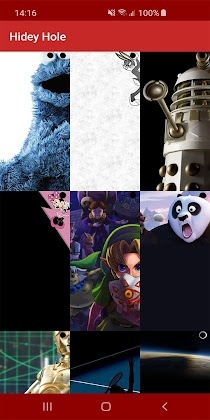
Explore an extensive gallery of creative cutout wallpapers
– Apply directly to Home screen, Lock screen, or both
Fine Image Tuning: Adjust brightness, contrast, black point, and saturation
– Smart Image Rescaling: Perfectly align the cutout position with your camera hole
Sort items by newest releases or all-time popularity
– Filter backgrounds by device model
Browse by specific categories
Save high-definition wallpapers directly to storage
Update Notifications
The scraper pulls every image linked within qualifying community posts, requiring a minimum width of 640 pixels (direct Reddit and Imgur links are temporarily excluded).
Community comment parsing may arrive in a future update, but is not currently supported.
Wallpapers are organized into collections based on the original submission flair tags.
Several community designs incorporate visible device frames. While these look flawless on their native device model, they rarely translate smoothly to other screens. They may look awkward when resized, though you are free to experiment with them.
Complete Freedom!
Enjoy the complete experience completely free, with zero ads, no in-app purchases, and no analytics tracking. Full backend code access is even supported!
Share Your Thoughts
Feel free to provide feedback via standard review channels, or engage directly through dedicated project threads.
Motion Effect Consideration
Dynamic motion effects can disrupt the careful positioning needed for cutout wallpapers, and the application cannot override this system behavior directly. To disable it, simply set a standard Samsung stock wallpaper from your settings, turn off the motion effect toggle, and then reapply your desired graphic via Hidey Hole.
To disable this, simply execute the following ADB shell command: settings put system wallpaper_tilt_status 0.
How to install
- Download the APK file above to your phone.
- Allow “Install unknown apps” when prompted.
- Open the downloaded APK and tap Install.
- If the package includes OBB/XAPK data, follow the bundled instructions.
MOD APKs are modified builds, so Play Protect may show a warning. Install only if you trust the file; use at your own risk.