

Screenshots







Description
- Home /
- Apps
Calculator Vault: App Hider MOD APK (Pro Unlocked) 3.9.5_5ab0aa47d
- Apps
- Tools
Discover what Calculator Vault's hidden apps can do for you with these standout benefits: TELEGRAM Report Developer Hide Apps (NO ROOT) Size 57 MB Version 3.9.5_5ab0aa47d Requirements 5.0 Get it on
- Telegram
Report this app
Images
Mod Info
- Pro Features Unlocked
Description
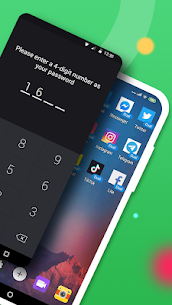
Calculator Vault: App Hider lets you conceal any app on your phone so your privacy stays protected. You can open your hidden apps from inside Calculator Vault or directly from your phone's home screen. Calculator Vault also includes a hidden photo feature: pictures you import go into a secure gallery where others cannot see them, and you can browse your protected photos inside the hider's gallery.
Benefits of Calculator Vault's hidden apps: - The notification bar shows only the standard calculator icon. - In your phone's system settings, the app appears as Calculator+ rather than App Hider. - When you check recent apps, it appears as Calculator Vault instead of App Hider.
Key features: 1. Hide any installed app without rooting your device. 2. Password protection, which you set up the first time you launch the app. 3. Works with any app you use on your phone, making app hiding simple. 4. Hidden apps can be opened from within Calculator Vault or from your phone's main interface. 5. The app opens as a standard calculator, so anyone without the password cannot reach the vault. 6. Notification controls with three modes: show all, show just the number, or show none. 7. Remove hidden apps from the recent apps list. 8. Gallery module for hiding photos and pictures, keeping your private images away from prying eyes. 9. A shortcut to the built-in hidden camera for taking private photos. 10. Hide videos and play them within the vault. How to use Calculator Vault: On first launch, or while the app is in its protected state, you can enter Calculator Vault without a PIN. Open the app and set your password, then you can start adding apps to hide.
How to hide photos in Calculator Vault: Tap the gallery icon in the app hider interface to open the Gallery Module. Enter a name in the input field to create a folder, then choose the pictures or personal photos you want to protect and tap the save button. The images will be imported into your new private folder.
How to add an app to Calculator Vault: On the hidden apps screen, tap the add app button to see the apps installed on your phone. Select the app you want to move into Calculator Vault - App Hider, then tap the import apps button.
How to remove apps from Calculator Vault: On the hidden apps screen, press and hold the hidden app, then drag it onto the delete icon to remove it from the vault.
How to hide photos or videos: Tap the gallery icon in the app hider interface to open the Gallery Module. Enter a name in the input field to create a folder, then choose the pictures, videos or personal photos you want to protect and tap the save button to import them into your new private folder.
Notes: If you uninstall an app that is hidden outside of Calculator Vault, the vault will not copy that app's original data over to the version inside Calculator Vault.
Related apps
Insget 3.14.4 Spaple 88.09 MB Premium Unlocked Poke Genie 8.19.1 Poke Genie 107.92 MB NekoBox+ 1.4.2-101 NekoBox+ 159.46 MB No Ads Inure App Manager build107.3.0 Hamza Rizwan 25.96 MB Premium Unlocked SmartCookieWeb 17.0-beta3 SmartCookieWeb 5.40 MB No Ads
How to install
- Download the APK file above to your phone.
- Allow “Install unknown apps” when prompted.
- Open the downloaded APK and tap Install.
- If the package includes OBB/XAPK data, follow the bundled instructions.
MOD APKs are modified builds, so Play Protect may show a warning. Install only if you trust the file; use at your own risk.