

Screenshots
Description
C4droid – C/C++ Compiler & IDE Mod APK
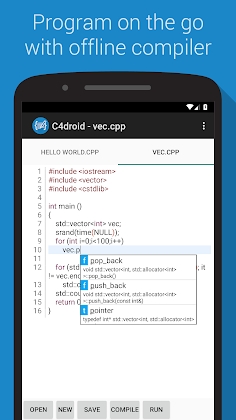
C4droid stands out as the ultimate C and C++ IDE and compiler tailored for Android devices.
* Offline C/C++ compiler: Build your own software and run it directly on Android without requiring an internet connection
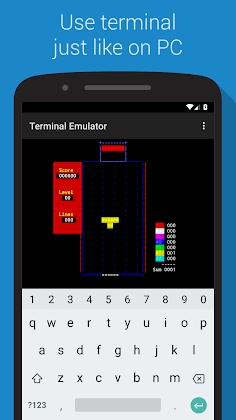
* Rich graphical library integration covering NativeActivity, Qt, SDL, SDL2, and Allegro
* Export and share your projects seamlessly as standalone APKs or executable binaries
* Built-in interactive debugger equipped with breakpoints and watch windows
CMake and Makefile integration: Run your desktop build automation directly on mobile (BusyBox included).
* Feature-packed code editor offering syntax highlighting, tab navigation, code completion, auto-formatting, file associations, and undo/redo history
* Operates without root access (though root can still be utilized to execute specific programs if desired)
* Complete ANSI C standard support and ISO C99 compliance via TCC (Tiny C Compiler) coupled with musl libc
* Full-fledged C++ compiler delivering C++11 standard support powered by GCC
* Built-in Git version control integration
* Customizable user interface letting you place or hide tabs and action buttons as you see fit
* Semi-automated porting system for open-source libraries to streamline learning and advanced programming
While C4droid works seamlessly straight out of the box, here are answers to a few frequent questions.
How do I manage Makefiles and multi-file projects?
Long-press the compile button (or open compilation settings if the button was customized or hidden) to configure the target mode for your working directory.
Tap OK to generate a .c4droid configuration file; keep in mind that modes like Makefile require specifying the output executable name.
After completing the setup, simply tap compile or run to build and launch your application.
How can I work with graphics libraries in single-file mode?
First install the SDL plugin, then choose the G++ compiler inside C4droid settings.
C4droid automatically determines the appropriate execution mode through lightweight source code inspection.
Each graphics framework is recognized via its specific include directive (refer to the sample projects for details), so manual mode switches are unnecessary.
When building a single-source Qt application, remember to append #include "yoursourcefilename.moc" at the very bottom of your source file.
How can I set up C++ support manually?
Upon initial launch, C4droid prompts you to activate C++ support and handles the configuration semi-automatically.
Requirements and manual setup steps:
Internal storage required: around 100MB free space
1. Install the GCC plugin
2. Select the G++ compiler within C4droid settings
When utilizing C4droid specifically for compiling C code, selecting GCC instead of standard alternatives provides the best results.
How Can You Compile and Set Up Libraries?
The configuration process is largely identical to standard Makefile builds, though minor patching may occasionally be needed.
Verified compatible libraries currently include gmp-mpfr, mpc, neon, sqlite, and SDL_gfx (make sure to set --disable mmx).
Which Touch Gestures and Hotkeys Does C4droid Support?
Long-Press Gestures:
Tap the button to remove the file currently open.
Tap the Save button to store changes.
Tap the Open button to browse recently opened files.
Hit the Run button to launch execution without passing parameters.
Tap the Compile button to set up your active workspace directory.
Tab: Close the active tab.
Keyboard Shortcuts
Press Ctrl+C, Ctrl+V, or Ctrl+X to Copy, Paste, or Cut.
Press Ctrl+S to save or Ctrl+O to open a file.
Use Ctrl+Z to undo and Ctrl+Y to redo actions.
Jump to a specific line using Ctrl+L.
Search for text with Ctrl+F.
Highlight the entire document using Ctrl+A.
Press Ctrl+B to build or trigger completion.
Execute your program by pressing Ctrl+R.
Trigger code autocompletion with Ctrl+Space or Ctrl+D (note that Android system shortcuts may override Ctrl+Space).
Submit bug reports directly to [email protected]
The name C4droid stands for "c for android" or "c++ for android."
Because C4droid operates offline rather than through cloud servers, it generates genuine local binaries.
Binaries included in the APK are licensed under the (L)GPL terms; reach out via email for source code access covering GCC, Tiny C Compiler, BusyBox, and related components.
Android is a registered trademark of Google Inc.
Qt is a registered trademark owned by Digia.
How to install
- Download the APK file above to your phone.
- Allow “Install unknown apps” when prompted.
- Open the downloaded APK and tap Install.
- If the package includes OBB/XAPK data, follow the bundled instructions.
MOD APKs are modified builds, so Play Protect may show a warning. Install only if you trust the file; use at your own risk.