

Screenshots

Description
- Home /
- Apps /
- Video Players & Editors
ST Player 2.6.1.6
- Video Players & Editors
ST Player serves as a comprehensive suite for Android, functioning as a 4K and HD video player, music player, MP3 converter, video downloader, private storage vault, integrated web browser, video trimmer, storage optimizer, and media organizer. Developer STR Studio, Size 18.96 MB, Version 2.6.1.6, Requires Android 7.0. Mod Info: Premium Unlocked.
- Share on Facebook
- Share on Twitter
- Share on Pinterest
- Share on Telegram
- Share on Whatsapp
Report this app
Screenshots
About this app
ST Player is a versatile all-in-one Android utility that acts as a 4K/HD video player, music player, MP3 converter, downloader, secure vault, web browser, video editor, and file manager.
Experience seamless HD, Full HD, 4K, and 8K playback, stream media online, convert videos to MP3, secure your sensitive files, and organize your device storage within a single, intuitive interface.
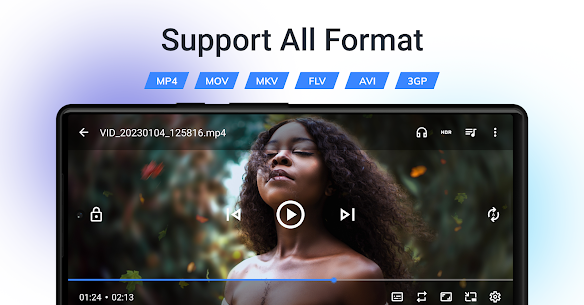
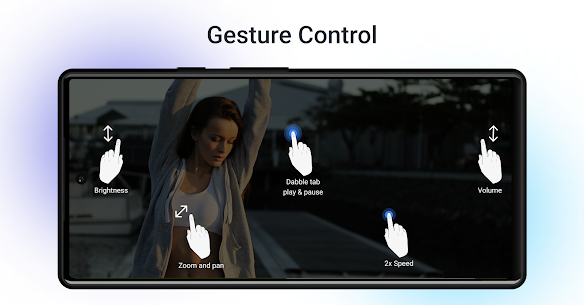
4K and HD Video Player: Enjoy a smooth experience with a high-speed player that supports all formats: • Plays MP4, MKV, AVI, MOV, FLV, WMV, WEBM, 3GP, TS, M4V, and others. • Supports HD, Full HD, 4K, 8K, and HDR playback. • Features hardware acceleration with HW/SW decoder compatibility. • Includes popup playback, background mode, and PiP (Picture-in-Picture). • Offers gesture-based controls for volume, brightness, zooming, and seeking. • Includes playback speed adjustment, sleep timer, looping, and bookmarking. • Provides screenshot capabilities, playlist management, and auto-play for next videos. • Supports casting to compatible TVs and streaming hardware.
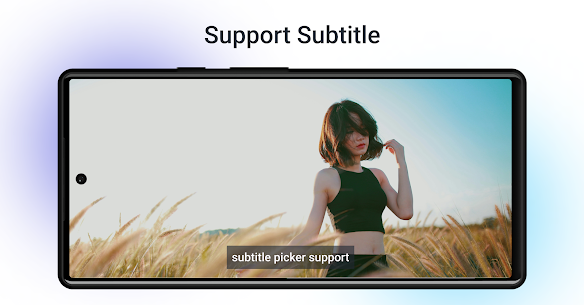
Subtitle Support: • Manual subtitle file loading. • Automatic detection of subtitles. • Compatible with SRT, ASS, SSA, VTT, and more. • Customizable sync, text size, and styling. • Options to set default audio and subtitle tracks.
Video Downloader & Online Browser: • Integrated private web browser. • Online video streaming capabilities. • Intelligent detection of downloadable media from supported sites. • High-quality video downloads. • Background downloading support. • Features for browser history, bookmarks, and site blocking.
MP3 Converter & Audio Extractor: • Convert video files to MP3. • Seamless MP4 to MP3 conversion. • Extract audio tracks directly from videos. • Track conversion history. • Easy saving and sharing of converted audio files.
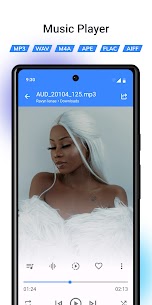
Music Player & MP3 Player: • Plays MP3, FLAC, WAV, AAC, M4A, and various other audio formats. • Sort by albums, artists, favorites, and custom playlists. • Queue management and convenient swipe gestures. • Background music playback. • Lock screen and notification bar controls. • Support for music widgets and quick tiles.
Equalizer & Audio Effects: • Built-in music equalizer with various presets. • Enhance sound with bass boost, reverb, and virtualizer effects. • Equalizer support for video playback. • Save custom equalizer configurations.
Private Vault: • Securely hide photos, videos, and other sensitive files. • Protect your data with a PIN or password. • Fingerprint authentication support. • Import, export, move, or delete files within the vault. • Encrypted storage architecture. • Secure in-app file viewer and gallery.
Recycle Bin: • Send deleted audio, video, and media files to the Recycle Bin. • Recover deleted content easily. • Option to delete permanently or clear the bin. • Customizable retention periods of 7, 15, 30, or 60 days. • Auto-purge expired files. • Monitor storage usage occupied by the bin.
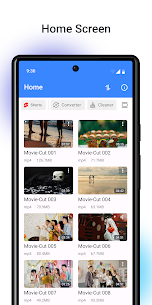
Video Cutter, Trimmer & Converter: • Precisely trim and cut video clips. • Intuitive timeline-based video editing. • Convert between different video formats. • Compress and save your edited media. • Share videos directly to other platforms.
Storage Cleaner & File Manager: • Scan for large files. • Identify duplicate videos. • Tools for optimizing device storage. • Efficiently organize your music, videos, and downloads. • Rename, delete, share, and view detailed file properties.
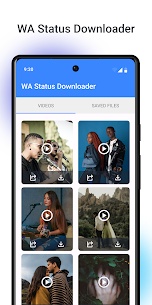
Status Saver: • View and browse status images and videos. • Download and save status files directly to your device.
Network Stream Player: • Open video links directly. • Stream media content from network URLs. • Built-in player for online streams.
Smart Settings & Personalization: • Comprehensive settings for video, audio, vault, and recycle bin. • Choose between dark mode and various stylish themes. • Multi-language support. • Integrated help, support, and FAQ sections. • A clean, fast, and modern user interface.
ST Player consolidates a 4K video player, HD media player, MP3 player, downloader, converter, secure vault, recycle bin, browser, trimmer, status saver, and file manager into one powerful application. Download ST Player from GameMod.dev for high-quality playback, enhanced media security, online streaming, and effortless file management.
Similar applications
XPlayer 2.9.3 by InShot Inc. (38.67 MB) with Premium Unlocked. TPlayer 8.2b by RN Entertainment (13.68 MB) with Premium Unlocked. BitTorrent 8.4.2 by bittorrent.com (44.40 MB) with Pro Unlocked. Compress Video Size Compressor 21.7.0 by Inverse.AI (31.26 MB) with Premium Unlocked. VN Video Editor 2.23.1 by Ubiquiti Labs LLC (446.54 MB) with Pro Unlocked.
How to install
- Download the APK file above to your phone.
- Allow “Install unknown apps” when prompted.
- Open the downloaded APK and tap Install.
- If the package includes OBB/XAPK data, follow the bundled instructions.
MOD APKs are modified builds, so Play Protect may show a warning. Install only if you trust the file; use at your own risk.