

Screenshots

Description
ePro Dev. TeamSize
16 MBVersion
3.0.21Requirements
5.0Get it on
Report this app
Images
Mod Info
- Premium Unlocked
Description
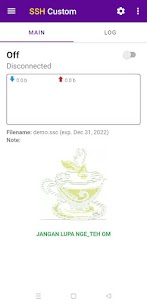
SSH Custom is a secure Android SSH client that supports payloads, proxies, SNI, and advanced configurations for private and flexible internet browsing.
SSH Custom: Secure and Private Internet Browsing Tool
SSH Custom functions as a powerful Android SSH client that helps you browse the internet with enhanced privacy and security. This application allows you to configure multiple connection methods, including SSH, payloads, proxies, and SNI settings. It also supports advanced features such as payload rotation and proxy switching, making it a flexible tool for users who want greater control over their network traffic.
Getting Started with SSH Custom Profiles
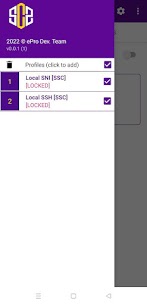
To begin using SSH Custom, you need to create and manage connection profiles. These profiles store your configuration settings and allow you to switch between different connection types easily.
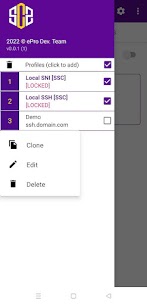
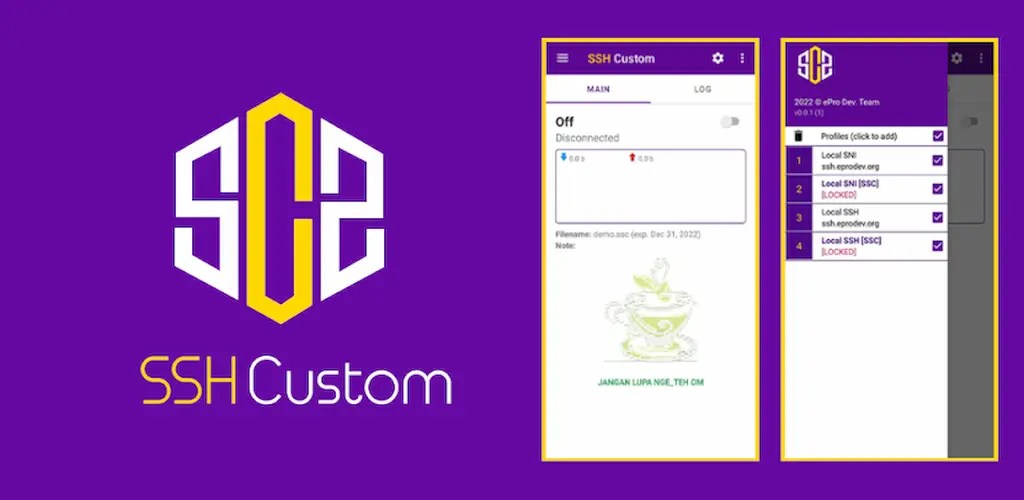
You can add a new profile by selecting the “Profiles” option in the side menu and tapping to create one. If you want to modify an existing profile, simply double-click it or press and hold until the edit menu appears. The same long-press action also lets you clone a profile or delete it if it is no longer needed. This approach makes profile management fast and efficient, especially if you frequently switch between configurations.
Basic Profile Configuration Methods
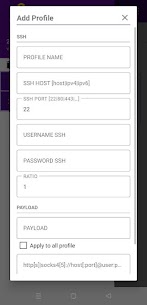
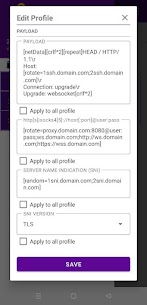
SSH Custom supports several standard setup methods depending on your connection needs. For a normal SSH configuration, you can leave the payload, proxy, and SNI fields empty. If you prefer using SNI, you should set the SSH port to 443, leave payload and proxy fields blank, and define the SNI value.
When configuring a payload-based connection, you need to input a payload and define a proxy without including a URL schema. For WebSocket (WS) profiles, you must configure both payload and proxy, and you can include or exclude “http://” in the proxy. If you leave the proxy empty, you must set the bug host as the SSH host and use port 80.
For secure WebSocket (WSS), you must define a payload and use a proxy that starts with “https://”. If no proxy is set, you should configure the bug host as the SSH host and use port 443, along with specifying the SNI value.
Additionally, SSH Custom allows SOCKS proxy configurations. In this case, you leave the payload empty and define a proxy that begins with either “socks4://” or “socks5://”.
Understanding Primary Initialization Parameters
SSH Custom includes a range of primary initialization variables that help you customize connection requests. These parameters define how the connection starts and how data flows.
For example, you can use variables to define request types, protocols, and connection endpoints such as host, port, or IP address. There are also options to specify proxy details and control end-of-line (EOL) behavior. The application even allows you to set a custom user agent, which can be useful for simulating browser requests or bypassing certain restrictions.
Advanced Secondary Initialization Options
Beyond basic configuration, SSH Custom provides advanced secondary initialization features. These include options for rotating values and generating random elements within your configuration.
You can define rotation rules to cycle through multiple hosts or payloads, improving reliability and flexibility. Randomization options also help create dynamic requests, which can enhance privacy and reduce detection. Additionally, you can control how many line breaks (EOL) appear in your request by specifying numeric values.
Limitations You Should Know
Despite its powerful features, SSH Custom has several limitations that you must consider when configuring profiles. The application does not allow combining HTTP(S) proxies with SOCKS proxies within a single profile. It also does not support rotation or randomization for SOCKS proxies.
Another restriction involves SNI usage. You cannot combine normal SNI settings with custom payloads, WS, or WSS configurations because SNI requires an empty payload. Furthermore, SSH Custom does not support nested secondary initialization, meaning you cannot place one rotation or random function inside another.
Recommended Solution for Complex Configurations
To work around these limitations, you should create multiple profiles instead of trying to combine all settings into one. By separating configurations into different profiles, you can maintain flexibility while avoiding compatibility issues. This method ensures that each profile works optimally without conflicting settings, allowing you to switch between them based on your needs.
Developer's apps
e-V2ray 5.5.8 ePro Dev. Team 22.30 MB Premium Unlocked HTTP Custom 7.11.28 - Patch 1 ePro Dev. Team 30 MB Premium UnlockedRelated apps
Insget 3.14.4 Spaple 88.09 MB Premium Unlocked Poke Genie 8.19.1 Poke Genie 107.92 MB NekoBox+ 1.4.2-101 NekoBox+ 159.46 MB No Ads Inure App Manager build107.3.0 Hamza Rizwan 25.96 MB Premium Unlocked SmartCookieWeb 17.0-beta3 SmartCookieWeb 5.40 MB No AdsHow to install
- Download the APK file above to your phone.
- Allow “Install unknown apps” when prompted.
- Open the downloaded APK and tap Install.
- If the package includes OBB/XAPK data, follow the bundled instructions.
MOD APKs are modified builds, so Play Protect may show a warning. Install only if you trust the file; use at your own risk.