
MOD features
- Premium.
Screenshots
Description
Screen & Manga Translator is an Android translation app built for readers of manga and webtoons, as well as gamers and anyone using apps in a foreign language. Created by COSMOMIME, it combines text recognition, on-screen translation, batch image processing, and a built-in translation browser, so you can translate content without taking screenshots and switching between apps.
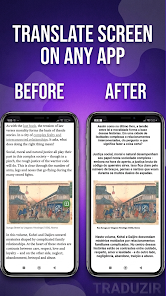
Translate on-screen text instantly while reading comics or playing games
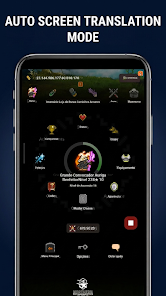
Screen & Manga Translator includes a floating overlay that lets you access translations while you keep using other apps. You can capture the entire screen and translate it with a single tap. Auto-Translate detects screen changes on its own, which suits dialogue-heavy games and auto-scrolling webtoons. A Quick Settings Tile also lets you launch the translation service straight from Android's quick settings panel.
This is especially handy when content isn't available in your language. Rather than taking a screenshot, opening a separate translator, uploading the image, and then returning to the app, you can translate the text right where you're viewing it, without leaving the main application.
Text recognition optimized for comics and webtoons
Screen & Manga Translator is designed for the complex layouts common in comics. It offers several text processing modes for black-and-white manga, screentone art, and full-color digital comics. Before displaying the translation, the OpenCV Inpainting tool removes the original text and restores the background.
Shrink, Expand, and Strict modes adjust the translated text to fit inside speech bubbles. The app supports both horizontal and vertical layouts, including right-to-left manga and vertically scrolling webtoons. As a result, translations line up closely with the original page structure instead of appearing as separate paragraphs.
Batch image processing and series export
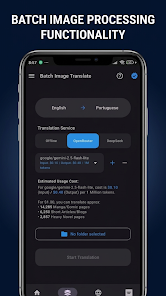
Beyond live screen translation, Screen & Manga Translator can process several images at once or entire folders. Series Mode organizes comics by folder, tracks your reading progress, and handles manga in batches. Finished content can be exported as PDF, CBZ, or ZIP files for use on e-readers.
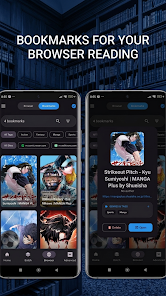
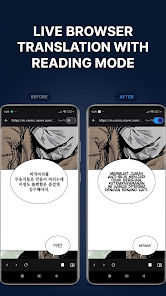
The app also includes a translation browser. You can open manga or light novel sites inside the app, save favorite sources with Smart Bookmarks, and translate web content without constantly switching between a browser and a translation tool. If a translation isn't accurate, you can manually edit the recognized text and translated content before using it.
Tips and guide for Screen & Manga Translator
To get started with Screen & Manga Translator, try the quick translation feature on a simple image or screen first to see how it recognizes text. When translating comics, choose the preprocessing mode that matches each image type to get the best recognition and text removal. Black-and-white manga and color webtoons have very different backgrounds, so picking the right mode makes a noticeable difference in translation quality.
If you often use games or apps with constantly changing content, Auto-Translate can save you a lot of manual effort. For screens with many moving elements or effects, though, check the translation results instead of relying on automatic translation alone. For longer comics, Series Mode and batch translation are much more convenient than handling each page one at a time.
Conclusion
Screen & Manga Translator is built for translating directly on screen on Android, rather than working as a standard text translator. Features such as screen translation, Auto-Translate, comic layout recognition, speech bubble customization, batch processing, PDF/CBZ/ZIP export, and an integrated translation browser make it a good fit for comic readers, webtoon fans, language learners, and gamers who often run into content that hasn't been localized. If you need to translate large volumes of comics, the series management tools and manual editing give you more flexibility.
How to install
- Download the APK file above to your phone.
- Allow “Install unknown apps” when prompted.
- Open the downloaded APK and tap Install.
- If the package includes OBB/XAPK data, follow the bundled instructions.
MOD APKs are modified builds, so Play Protect may show a warning. Install only if you trust the file; use at your own risk.