

Screenshots
Description
Rootify (Root) MOD APK
Root access and BusyBox are required. This app does not root your phone. Put all the powerful root tools right at your fingertips.
Features:
1. Boost device performance
2. Manage the CPU
3. Use the power menu
4. View system details
5. Browse the build.prop viewer
6. Use the simplified terminal
PERFORMANCE Tab
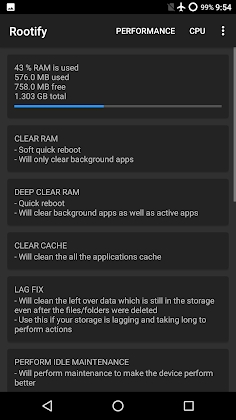
1. RAM Usage: Check how much RAM your system and apps are consuming
2. Clear RAM: Free up RAM held by background apps you don't need
3. Deep Clear RAM closes all background and foreground applications
4. Clear cache: If cached data is piling up, use this tool to wipe it
5. Fix storage that runs slowly or takes too long to complete basic tasks with this feature.
6. Remove empty folders that are cluttering your storage, with several options available for deleting them all
7. Maintenance: If your device feels sluggish or suffers from memory leaks, use this feature to improve performance
8. Calibrate Battery: If your battery is running low, use this option to extend its lifespan or clear out old stats.
9. Delete logs to stop continuous logging, since the Android system constantly writes log files.
10. Clean System Trash: Clear out logs and other leftover files filling up your ROM to improve device performance.
CPU Tab
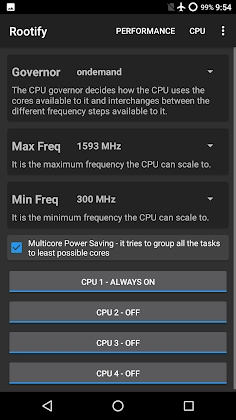
1. Governor: Choose the governor that controls how the CPU is used
2. Maximum Frequency: Select the highest frequency the CPU is allowed to run at
3. Select the minimum frequency to set the lowest frequency the CPU may use
4. Multicore Energy Savings: Save battery by grouping tasks so they run on as few cores as possible
5. Cores Online: Select the cores that handle the device's workload, then disable them to conserve battery
6. Cores Offline: Select the cores that stay idle while others continue working
POWER MENU Tab
1. Power off your device with a single tap.
2. One-click restart: Power off and then boot back up in a single step
3. Shut down and restart into Safe Mode.
4. Restart into Bootloader – Power down and enter bootloader mode directly.
5. Shut down and reboot into recovery mode to begin your recovery actions.
6. Trigger a Quick Hot Reboot.
System Details Tab
1. Device Info – Comprehensive hardware and software specifications for your phone.
2. Wi-Fi Passwords: Reveal all network passkeys stored on your device.
3. Kernel Information: Inspect complete details about your active kernel.
4. Memory Overview: Monitor real-time RAM usage and storage stats.
5. VM Info – Access detailed metrics regarding your Android Virtual Machine.
build.prop – Built-in /system/build.prop inspector
Streamlined Terminal Utility
1. Execute terminal commands with elevated root access.
2. Launch and run your custom scripts with ease.
3. View command results in a clean, readable layout.
Disclaimer: The creator assumes no liability for any issues that may arise from using this tool. Proceed at your own discretion.
How to install
- Download the APK file above to your phone.
- Allow “Install unknown apps” when prompted.
- Open the downloaded APK and tap Install.
- If the package includes OBB/XAPK data, follow the bundled instructions.
MOD APKs are modified builds, so Play Protect may show a warning. Install only if you trust the file; use at your own risk.