

Screenshots



Description
- Home /
- Apps
[Root] LiveBoot MOD APK (Pro Unlocked) 1.92
- Apps
- Tools
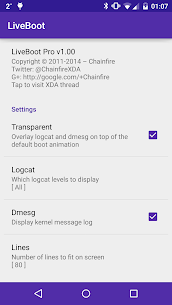
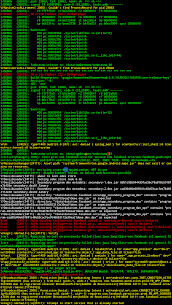
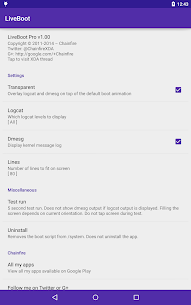
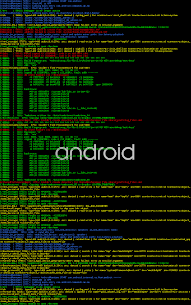
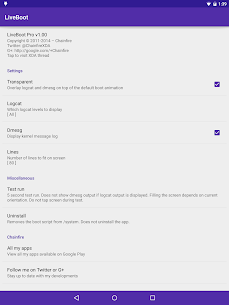
LiveBoot is a boot animation that displays logcat and dmesg output on your screen in real time. You can customize the output by choosing the logcat level, buffer and format, deciding whether to show dmesg, setting how many lines fit on screen, enabling word wrap, and turning color coding on or off. Once configured, LiveBoot can also make its background transparent so it overlays the existing boot animation, which looks great while your device starts up. Developer: Chainfire | Size: 1 MB | Version: 1.92 | Requires: Android 5.0 | Available on GameMod.dev
- Telegram
Report this app
Images
Mod Info
- Pro / paid features unlocked;
- Unnecessary permissions, receivers, providers and services removed;
- Graphics optimized and zipaligned, with resources cleaned up for faster loading;
- Debug code removed;
- Default .source tags naming the corresponding Java files removed;
- Languages: full multi-language support;
- CPUs: armeabi-v7a, arm64-v8a, x86, x86_64;
- Screen DPIs: 160dpi, 240dpi, 320dpi, 480dpi, 640dpi;
- Original package signature changed;
Description
LiveBoot is a boot animation that displays logcat and dmesg output on your screen in real time. You can customize the output by choosing the logcat level, buffer and format, deciding whether to show dmesg, setting how many lines fit on screen, enabling word wrap, and turning color coding on or off. You can also make the background transparent so LiveBoot overlays the existing boot animation, which looks awesome during startup.
A built-in test feature lets you check your current configuration without rebooting. Lines shown in test mode may be limited and fairly static, so it does not fully reflect real boot-time behavior. It simply confirms that everything works and gives you an idea of how large the text will appear.
Note that LiveBoot only appears after the data partition is mounted. If you need to enter a decryption key or pattern at boot, it will not show until you have done so.
Root
This app requires root, specifically SuperSU version 2.40 or newer or a recent version of Magisk, because of how the boot-time code is launched. Alternatively, it may work on other rooted firmware that supports init.d, but this is not officially supported and compatibility cannot be guaranteed.
Compatibility
The app officially supports Android 5.0 and newer, but whether it runs on your device depends on the specific model and firmware. It has worked on a number of my own devices across different firmware versions, though not on every one. Even when test runs succeed, that doesn't guarantee it will launch during boot. It usually does, but not always.
Because of this, continued operation can't be guaranteed. Something that works for you today may stop working after your next firmware update. If that's a concern, you may want to hold off on upgrading to Pro.
The chance of a bootloop is extremely low, but it isn't zero. If one happens, deleting the app's APK or /system/su.d/0000liveboot from recovery should resolve it.
Unless you use SuperSU in system-less mode, the app writes to /system, so your firmware needs to permit this. Currently there is no recovery-based installation option.
Pro
You can upgrade to Pro through an in-app purchase. This supports ongoing development and unlocks the transparency option, along with logcat buffer and format selection.
If you already own a paid version of the old live logcat or live dmesg boot animations, Pro mode will be enabled automatically.
As with some of my other apps, if you can't use Google Play but still manage to install the APK, Pro mode will be enabled as well.
If you'd rather not pay at all, there's also a button that enables Pro mode.
Script
If /system/su.d/0000liveboot.script or /su/su.d/0000liveboot.script is present (set to chmod 0644, not 0700 like other files in /system/su.d/ or /su/su.d/), the script will run in place of logcat and dmesg. Its output appears in white for stdout and red for stderr.
Discussion, support and more
For the official app thread, visit the XDA-Developers forum: http://forum.xda-developers.com/android/apps-games/liveboot-t2976189
Developer's apps
FlashFire MOD APK (Pro Unlocked) 0.73 Chainfire 14 MB DSLR Controller APK (Full Version) 1.06 Chainfire 1 MB 500 Firepaper MOD APK (Pro Unlocked) 3.00 Chainfire 2 MB
Related apps
Insget 3.14.4 Spaple 88.09 MB Premium Unlocked Poke Genie 8.19.1 Poke Genie 107.92 MB NekoBox+ 1.4.2-101 NekoBox+ 159.46 MB No Ads Inure App Manager build107.3.0 Hamza Rizwan 25.96 MB Premium Unlocked SmartCookieWeb 17.0-beta3 SmartCookieWeb 5.40 MB No Ads
How to install
- Download the APK file above to your phone.
- Allow “Install unknown apps” when prompted.
- Open the downloaded APK and tap Install.
- If the package includes OBB/XAPK data, follow the bundled instructions.
MOD APKs are modified builds, so Play Protect may show a warning. Install only if you trust the file; use at your own risk.