

Screenshots
Description
Softo TechSize
30 MBVersion
2.0.0Requirements
7.0Get it on
Mod Info
Premium Unlocked Report this app
Images
Description
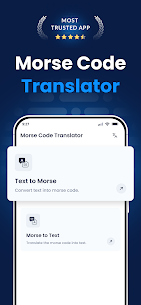
Use the free and fast Morse code translator to learn and convert Morse code into text and vice versa in real-time. It offers three Morse code play options, a list of quick codes, and a full Morse Code Chart.
The Morse code translator allows users to convert plain text into Morse code and decode any Morse code into simple text or the alphabet. This Morse code decoder and coder will help you to easily understand the message written in Morse code. It is a useful app for everyone to learn Morse code and convert Morse to text.
How to Use The Morse Code Translator App?
Follow these steps to use this Morse code translator app:
👉Install the Morse code translator app on your device.
👉Open the Morse code app.
👉Providing plain text, the app will automatically convert text into Morse code.
👉Now you can copy, download, or share the Morse code.
The above steps explain the process of converting text or alphabets into Morse code. Similarly, you can paste code in the input box and let the app translate and decode it into plain text.
Key Features of the Morse Code Translator
1. Double Way Translator
The Morse code app is a double-way translator. It can code plain text into Morse code as well as decode Morse code into plain text, alphabets, or numbers.
2. Transmission Options
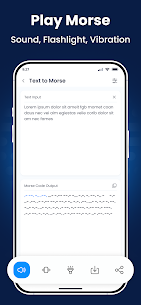
You can play the Morse Code signals into sound, flashlight, and vibration by clicking the respective icons.
3. Copyable and Shareable Output
The Morse code translator app provides copying and sharing options. So, you can copy the Morse code results to your clipboard and paste them anywhere. Also, you can share the translation with other apps.
4. Customizable
Our Morse code decoder app divides letters by a single slash (/), and words by a double slash (//). You can adjust and customize these default separators in the settings menu. Similarly, you customize or change the frequency.
5. No Words or Code Limit
The Morse code translator app can decode an unlimited number of words into clear text. Similarly, there is no specific limit for characters or words. Here, you can encode or decode lengthy messages without any boundaries.
6. Finger Tap Keyboard
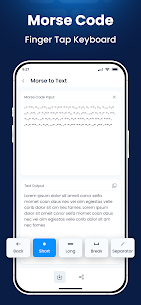
The Morse to text translator app offers a finger tap keyboard, using which you can type Morse code. The keyboard has a dot for a short tap, a dash for a long tap, and a slash for a separator.
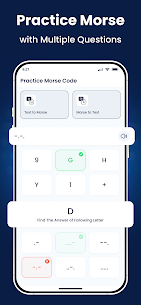
7. Learning Opportunity
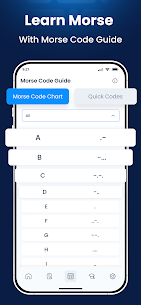
Our app also provides a module to teach users Morse code. For this, the app provides a “Morse Code Chart” that contains Morse code lists for the Alphabet, Numbers, and Special Characters. This unique feature of the app can help you a lot if you are interested in learning Morse code.
8. Quick Codes
It provides users with a list of “Quick codes” that are commonly used during Morse code communication. This feature will help you communicate instantly by providing you with ready-made text messages that you can copy and convert into Morse code.
9. Manual Sending
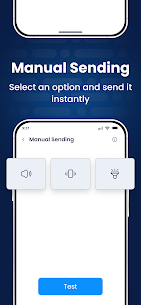
The manual sending feature lets users easily share Morse Code messages without typing. It is ideal for those who have learned Morse code. This option allows users to use vibrations or the device’s flashlight to transmit Morse code messages manually.
10. Custom Speed, Frequency, and Separator
You can configure sound frequency, separator (Gap), and playing speed according to your needs.
Benefits of the Morse Code Translator
• The Morse code app can help you learn Morse code. For this, the application provides an easy module.
• The Morse code translator does not demand that users spend even a single penny. Every conversion and learning opportunity is without any charge or subscription plan.
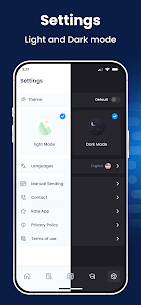
• This Morse code translator also provides users with a “Dark Mode”. Enabling the Dark mode is useful for eye protection and your device’s battery life.
• Our free Morse code to text translating app is available in a wide range of languages.
• It is very fast in encoding as well as decoding Morse code.
• There are no distracting ads displayed on this app.
Related apps
txtpad — Notepad & TXT Editor 3.5.1-premium My Cat's Lab 17.20 MB Premium Unlocked Screenshot Assistant 7.3.3082 Waskysoft 5.11 MB Premium Unlocked BuzzKill Notification Manager 40.0.0 Sam Ruston 24.60 MB Full Version Mute Video Remove Audio 4.8 RAYO INNOVATIONS PRIVATE LIMITED 14.60 MB Premium Unlocked WiFi Checker 1.25.3367 cxzh.ltd 12.51 MB Premium UnlockedHow to install
- Download the APK file above to your phone.
- Allow “Install unknown apps” when prompted.
- Open the downloaded APK and tap Install.
- If the package includes OBB/XAPK data, follow the bundled instructions.
MOD APKs are modified builds, so Play Protect may show a warning. Install only if you trust the file; use at your own risk.