

Screenshots



Description
ManageBox 3.2.5 APK is a versatile Tools app designed for Android
Download the latest version of ManageBox APK for Android via direct download link
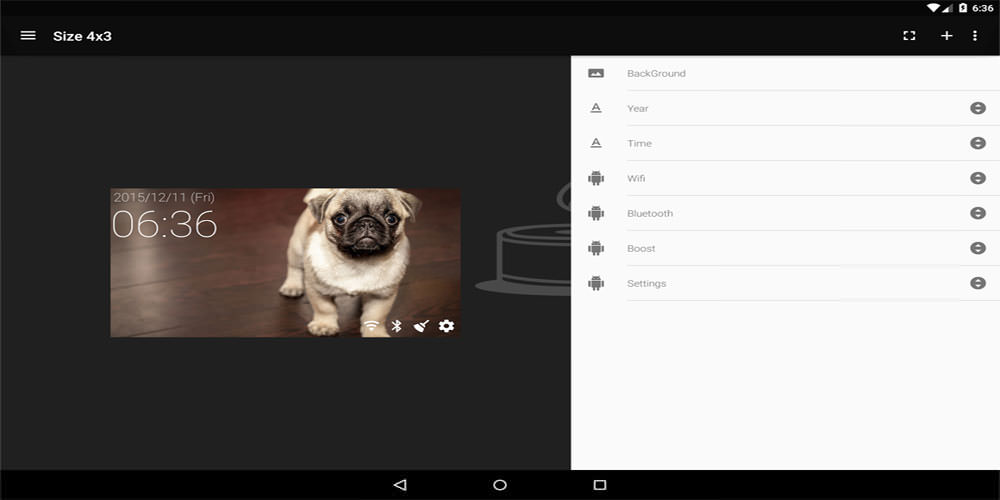
Seamlessly manage app uninstalls and backups while wiping cache and active background tasks with a single tap. Access numerous quick shortcuts from widgets or the notification tray to tweak your device settings instantly from anywhere.
An ideal utility for anyone looking to combine a comprehensive app manager with a lightweight task killer.
Key Features App Manager – Easily back up or remove applications. – Review and enable or disable system packages.
Task Manager – Monitor active background processes (*note: restricted on Android 7 Nougat and newer). – Free up RAM with one touch. – Automate memory optimization (by schedule, screen triggers, or RAM thresholds).
Cache Cleaner – Inspect temporary cache data. – Instantly wipe cached files (*restricted on Android 6 Marshmallow and newer). – Scheduled auto-cache clearing (*restricted on Android 6 Marshmallow and above).
Sub-Launcher – Quick-access application tray. – Fast device settings toggles.
Notification Bar – Monitor vital stats like battery percentage and RAM usage right from the notification icon. – Pin your go-to shortcuts for easy access.
Widgets – Design custom widget layouts tailored to your preference. – Place your favorite actions and shortcuts on the home screen.
Floating Overlay – Keep essential quick-launch shortcuts floating over any screen.
Shortcut Customizer – Integrate shortcuts offered by third-party apps. – Add convenient home screen shortcuts. – Combine multiple actions into custom multi-function shortcuts.
Note for Android 2.x Users
Compatibility was discontinued starting from version 3.0.3. Details regarding compatibility and changes are documented on the official site. Please review this if you are upgrading to ver3.0.
What's New in ver3.2.1 Now supports generating APK backup files labeled with the actual application name.
How to install
- Download the APK file above to your phone.
- Allow “Install unknown apps” when prompted.
- Open the downloaded APK and tap Install.
- If the package includes OBB/XAPK data, follow the bundled instructions.
MOD APKs are modified builds, so Play Protect may show a warning. Install only if you trust the file; use at your own risk.