

MOD features
- No MOD.
Screenshots
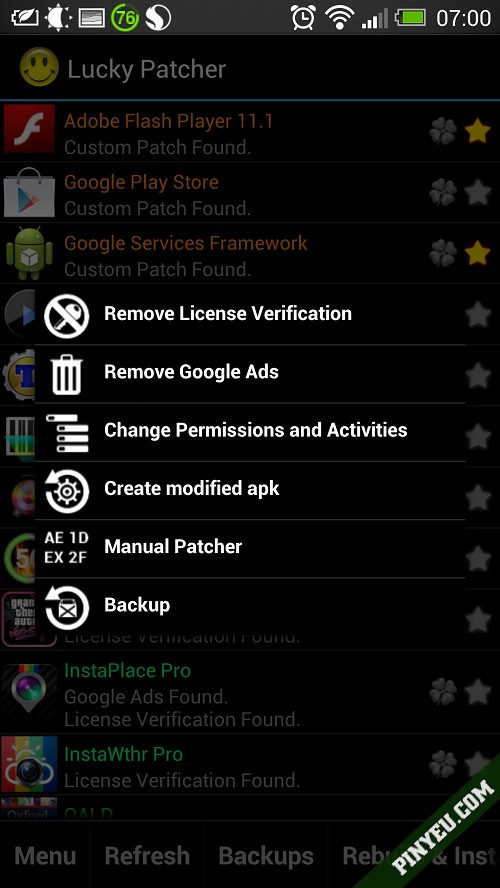
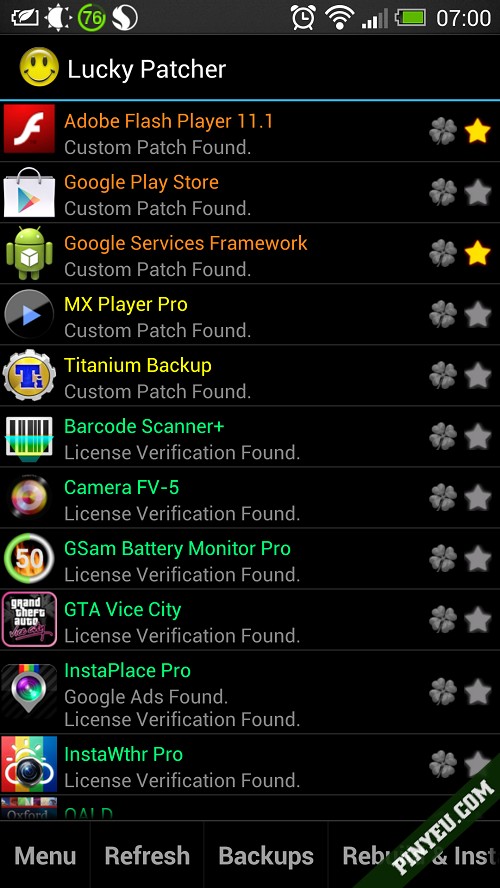
Description
Lucky Patcher is a popular Android app that lets you bypass license checks and remove ads from games and apps with ease.
Lucky Patcher: a tool for changing app permissions, stripping license verification, and blocking ads on Android devices.
The main purpose of Lucky Patcher is to unlock paid apps and games from Google Play that normally require a purchase. Built by a team of developers, it handles nearly every patching task with a single tap. Because of its nature, it isn't available on official Google platforms, so it's usually shared through modding communities. The app supports several languages and weighs only about 7 MB. If you run into a functional error, simply restart the app to use it again.
Key features of Lucky Patcher
- Remove ads across the system and within Android apps
- Strip license verification from apps
- Change app permissions
- Remove license verification
- Install a modded Google Play Store
- Clear the Dalvik cache
- Create modded .apk files
- Install unsigned APK files
- Back up apps, plus many other tools
How to use Lucky Patcher
- A rooted phone is required
- Once installed, opening Lucky Patcher shows a list of the apps on your device. Depending on what each app supports, its name is color-coded:
- Green: The app uses license verification and has a high patching success rate. Tap and hold, then choose “Remove License Verification”
- Yellow: The app can be modified with a custom patch. Tap and hold, then choose “Custom Patch”
- Cyan: The app contains Google ads. Tap and hold, then choose “Remove Google Ads”
- Red: The app cannot be modified, or there is nothing to change
- Purple: The app is on the boot list
- Orange: A system app, so proceed with caution
What's new in this version?
- No MOD.
How to install
- Download the APK file above to your phone.
- Allow “Install unknown apps” when prompted.
- Open the downloaded APK and tap Install.
- If the package includes OBB/XAPK data, follow the bundled instructions.
MOD APKs are modified builds, so Play Protect may show a warning. Install only if you trust the file; use at your own risk.