

MOD features
- Premium.
Screenshots

Description
Komx is an Android comic and manga reader that lets you open local files and run AI tools right on your device. It supports common formats such as ZIP and CBZ, as well as image folders containing JPEG, PNG, or WEBP files. Beyond reading, Komx can colorize black-and-white manga using artificial intelligence, recognize text, and translate content directly on the comic pages.
Read comics and manga right on your Android device
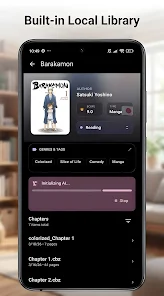
One of the highlights of Komx is its built-in library system, which stores your comics locally on the phone. You can open ZIP or CBZ files and image directories directly, with no need to convert them into another format. This makes it a great fit for anyone who already has a manga collection on their device and wants a polished reading experience.
The app's library tools also include custom categories, global tags, and Folder Merge, so you can easily organize comics spread across several folders. This makes searching for titles and picking up where you left off much simpler.
Colorize black-and-white manga with artificial intelligence on your device
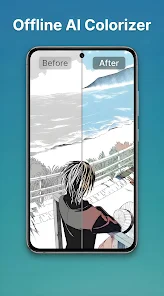
A standout feature of Komx is AI Colorization. The app uses ONNX and TensorFlow models to automatically add color to black-and-white comic pages. According to the developers, this processing happens entirely on the device rather than on a remote server.
Local processing is a good choice if you care about privacy or would rather not upload your images to online services. Keep in mind that AI coloring can demand significant hardware resources, especially when handling many pages at once, so performance will depend on your Android device.
Built-in OCR, translation, and Web Reader
Alongside reading and coloring, Komx uses Google ML Kit-based OCR to recognize text within comics. Once the text is recognized, you can use the built-in translation tool to understand manga or comics written in other languages. This is especially handy for imported comics that have no translated edition.
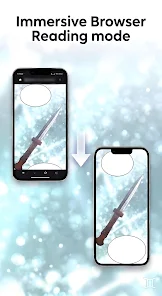
Komx also includes a Web Reader that lets you browse online comic pages through an integrated viewer. By combining your local library with browser functionality, you can manage saved content and access online sources without switching between multiple apps.
Tips for getting started with Komx
To begin with Komx, first grant storage access through Android's Storage Access Framework, then select the folder that holds your manga or comics. If your library is already in CBZ or ZIP format, you can open it directly and start reading. If you have many series, creating categories or using tags will keep your library easier to navigate.
If you want to try AI Colorization, start with a few black-and-white pages rather than processing entire series at once. Once you've reviewed the results, adjust how often you use it based on your device's performance. Use OCR and translation only when you need them to avoid consuming extra resources during reading.
Conclusion
Komx is more than a standard manga reader. It combines library management, a Web Reader, text OCR, translation, and AI colorization for black-and-white manga. Support for ZIP and CBZ formats along with image folders makes it flexible for anyone who keeps comics directly on their Android device.
If you want a single tool that reads manga and processes content with AI right on your phone, Komx is well worth a look. Its focus on local processing makes reading and managing your collection more independent and convenient.
How to install
- Download the APK file above to your phone.
- Allow “Install unknown apps” when prompted.
- Open the downloaded APK and tap Install.
- If the package includes OBB/XAPK data, follow the bundled instructions.
MOD APKs are modified builds, so Play Protect may show a warning. Install only if you trust the file; use at your own risk.