

Screenshots




Description
- Payment
The Olive TreeSize
2 MBVersion
1.32Requirements
2.1 and upGet it on
Report this app
Images
Mod Info
- Full Version
Description
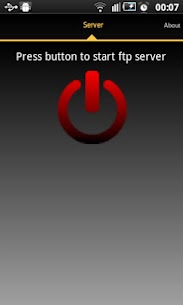
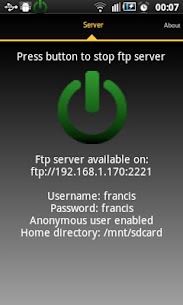
Read/write any folder, including sdcard, in your android device with this ftp server Pro. You can backup your photos to your PC, copy music and movies to you device, etc.
If you still do not have a ftp client I recommend FileZilla client (you can download it on http://filezilla-project.org/) but you can also use file explorer on windows.
Free version does not allow landscape screen.
Features:
Use any network interface in your device including: WIFI, Ethernet, Mobile network, USB…
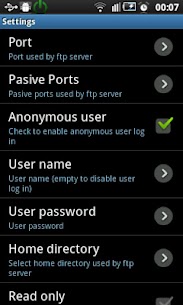
Anonymous user (can be disabled).
One Ftp user (can be disabled). Name and password can be changed.
Home directory can be root directory,
Read only mode.
Passive and active modes.
Show hidden files.
Custom home folder.
Option to run server as a foreground service.
Energy save mode.
Languages supported: English, Spanish, Romanian, French, Italian, Hungarian, German, Chinese, Portuguese, Korean, Russian and Catalan.
Intents:
com.theolivetree.ftpserver.StartFtpServerPro
com.theolivetree.ftpserver.StopFtpServerPro
TODO:
Run server as root user (only rooted devices).
TLS/SSL support for secure connections.
How to connect with Ftp server using USB cable:
This can useful when you have USB cable and not network available.
1) On your phone go to Settings->Applications->Development and set option “USB debugging”.
2) Connect your phone to your PC using USB cable.
3) Start adb server. On your PC run command “adb start-server”.
adb is a program that you can find on android sdk. Usually you will find it on android-sdkplatform-toolsadb.
4) Forward needed ports from your PC to your phone. On your PC run command “adb forward tcp:2221 tcp:2221”
You will need to repeat this step for all ftp server and passive ports configured in your phone. It will be easier if you use a small range of passive ports.
With this, any connection in your pc to 127.0.0.1:2221 will be forwarded to your phone in port 2221.
5) Run Ftp server in your phone, open settings and in “Network interfaces” select “Loopback (127.0.0.1)” or “All”
6) Start ftp server.
7) In your PC connect your ftp client to ftp://127.0.0.1:2221 (port might be different, it depends on your Ftp Server configuration).
Connections in this mode need to be always started by PC so only passive mode is available when using USB connection.
Permissions needed:
INTERNET
ACCESS_NETWORK_STATE
ACCESS_WIFI_STATE
Network permission to enable server to open network communication with ftp clients.
WRITE_EXTERNAL_STORAGE
Enables ftp server write received files from ftp clients on sdcard.
WAKE_LOCK
Keeps phone wake only while server is running. If phone is not wake connections to ftp server can fail.
Libraries used by this program: Apache ftp server v1.0.6. Apache2 License. Android viewflow pakerfeldt (01/Nov/2011). Apache2 License: http://www.apache.org/licenses/LICENSE-2.0.html
Special thanks to: Beatriz Vera, Surjit Panda, Alex Sovu, Balazs David Molnar, Damien Varvenne, Simone Balducci, Juanvi, Chengcheng Hu, Noelia, Noxa Tagakov, Joon Lim, Tomokazu Wakasugi and Paulino Feitio.
Related apps
Multi Parallel: Multi Accounts 4.1.60.1022 Winterfell Applab - Clone App & Status Downloader 9.58 MB Premium Unlocked IP Scanner 2.0.3 DigitalBox Studios 8.54 MB Premium Unlocked Computer Launcher Pro 19.27 Pro Themes and Launchers 12.29 MB Premium Unlocked Notifications archive 1.6.12 Difer 9.23 MB Premium Unlocked APN Varies with device APN Tech Ltd. Premium UnlockedHow to install
- Download the APK file above to your phone.
- Allow “Install unknown apps” when prompted.
- Open the downloaded APK and tap Install.
- If the package includes OBB/XAPK data, follow the bundled instructions.
MOD APKs are modified builds, so Play Protect may show a warning. Install only if you trust the file; use at your own risk.