

Screenshots

Description
- Home /
- Apps /
- Personalization
Evie Launcher MOD APK (No Ads, Optimized) 2.14.8-12
- Personalization
Explore Evie Launcher, an intuitive and versatile custom launcher crafted specifically for Android. Developer: Evie Labs Inc | Size: 8 MB | Version: 2.14.8-12 | Requirements: Android 4.2+
- Telegram
Report This App
Screenshots
MOD Info
Analytics, tracking metrics, and residual junk files have been removed; debug data stripped; internet permissions disabled; Google Play services detached; unnecessary receivers cleared from the manifest; ad bloat wiped clean; unneeded language packs deleted, leaving only Russian, Ukrainian, and English.
Description
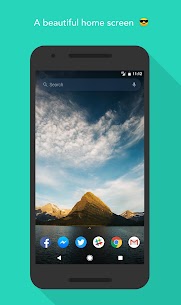
Evie Launcher is a completely free, lightweight personalization utility. Transform your daily Android experience with Evie, a top-tier home screen alternative engineered from the ground up for maximum fluidity and speed.
Key Features:
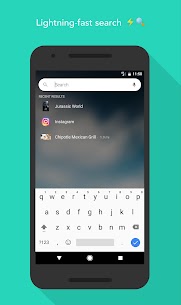
Universal Search: Query all installed applications simultaneously from a unified bar. Save time and let the smart engine fetch whatever you need.
Quick Navigation: Prefer not to type? Simply glide upward on your display to unveil your complete app drawer immediately.
Custom Shortcuts: Tap and hold any query result to generate personal quick actions. Need to reach a contact or trigger a routine in seconds? Set it as an instant shortcut.
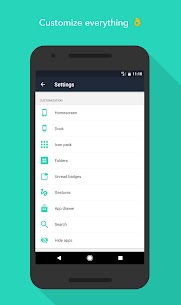
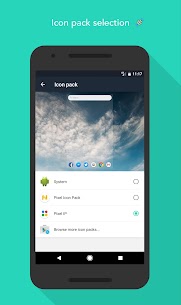
Deep Personalization: Easily import existing setups or design your interface from scratch—adjust grids, backgrounds, icon dimensions, and individual app icons. Your smartphone setup should reflect your personal taste. [1]
[1] When using double-tap to lock, selecting "Instant Lock" calls for Device Administrator privileges. The alternative "Time Lock" mode operates with no extra access needed.
What's New:
• Select your favorite search provider (Google, DuckDuckGo, or Bing) • Lock desktop icons in place • Broader offline search results with fewer keystrokes • Direct access to frequently launched apps in search (hidden items excluded) • Native Android O notification dots • Adjustable grid layouts for app drawers and custom folders
Helpful Tips:
• Open Settings: Long-press any blank section of the desktop, or enter "Evie Settings" directly into the search bar. • Organize Folders: Touch and hold any icon, then slide it onto another application. • Application Preferences: Hold down an icon to change its artwork and inspect quick settings. • Setup Shortcuts: Long-press an entry from your search results to dock it as a one-tap shortcut. • Delete from Screen: Hold an item and drag it straight toward the "Remove" banner located at the screen's top. • Create New Page: Tap, hold, and pull an icon to the right edge. Empty pages cannot be saved without an icon. • How to Uninstall: Deactivate the "Double Tap to Lock" gesture prior to removing the launcher.
Related Apps
Square Home 4.1.2 Total_Apps 6.40 MB Premium Unlocked | Tapet Wallpapers 11.000.155 Tapet 29.55 MB Premium Unlocked | Aline: bold linear icon pack 3.5.3 One4Studio 39.28 MB Full Version | AlineT: bold linear icon pack 3.5.3 One4Studio 47.07 MB Full Version | Caelus: linear icon pack 5.4.3 One4Studio 38.64 MB Full Version
How to install
- Download the APK file above to your phone.
- Allow “Install unknown apps” when prompted.
- Open the downloaded APK and tap Install.
- If the package includes OBB/XAPK data, follow the bundled instructions.
MOD APKs are modified builds, so Play Protect may show a warning. Install only if you trust the file; use at your own risk.