

Screenshots



Description
- Home /
- Apps
CPU Adjuster MOD APK (Pro Unlocked) 3.1.124
- Apps
- Productivity
Discover CPU Adjuster for rooted devices: fine-tune CPU and GPU settings with customizable profiles that run automatically. TELEGRAM Report Developer RYO Software Size 5 MB Version 3.1.124 Requires Android 2.3 Get it on
- Telegram
Report this app
Images
Mod Info
- PRO features Unlocked
Description
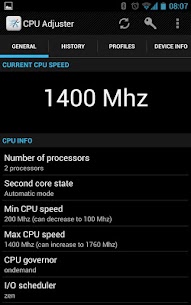
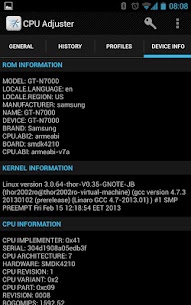
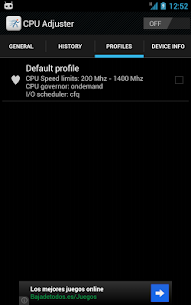
CPU Adjuster Pro is a new voltage control and CPU tuning app. For rooted users, it lets you build and automate CPU and GPU settings through its Profile Manager. Non-root users can still view detailed CPU information, including governor, clock speeds and more.
Profiles can include: – CPU governor – Maximum CPU frequency – Minimum CPU frequency – CPU voltages for each frequency (if the kernel supports it) – I/O scheduler – GPU frequencies and voltages (if the kernel supports it) – Charger voltages (if the kernel supports it)
Profiles can activate automatically based on these conditions: – Low battery – High temperature – Screen on/off – Charging – Connected to a PC – Voice call started
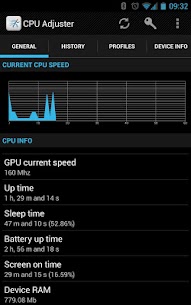
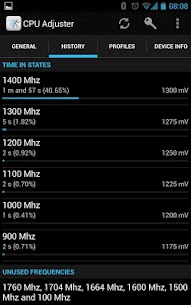
You can also check CPU statistics, such as how long the processor spends in each state, along with governor settings and minimum and maximum CPU speeds.
Permissions used: – Write external storage: to back up profiles – Receive boot completed: to start the service automatically at boot (enable in settings) – Read phone state: to detect when voice calls start and end – Internet: to display small ads (via Google Ads) – Billing: to manage donations (the PRO version can be purchased inside the app)
If you run into problems or bugs, please send us a logcat.
Tested on: – Samsung Galaxy Note (N7000) running Android 4.1.2 – HTC Desire running CM7 – LG Nexus 4 (not rooted)
The free version shows ads, is limited to 3 profiles, and cannot back up your settings. To remove ads and unlock every feature, you can buy the full version inside the app. Before leaving a low rating, please reach out to us by email or leave a comment describing your issue in the XDA thread.
In-app billing lets users Remove Ads Use an unlimited number of profiles
Developer's apps
APK Exporter MOD APK (Pro Unlocked) 1.6.59 RYO Software 6 MB Reboots Monitor MOD APK (Pro Unlocked) 1.2.20 RYO Software 2 MB ADB WiFi Reborn MOD APK (Pro Unlocked) 3.3.160 RYO Software 8 MB Events Notifier for Calendar MOD APK (Pro Unlocked) 3.28.407 RYO Software 9 MB Recycle Bin 2.4.69 RYO Software 9 MB
Related apps
AppBlock 7.21.2 MobileSoft s.r.o. 136.03 MB Premium Unlocked FairEmail 1.2339 Marcel Bokhorst FairCode BV 28.77 MB Premium Unlocked LazyBoard 2.7.21 Elsayed Hussein Abdallah 4.09 MB Premium Unlocked Side Dock 4.0.0 Quivox Engineering 99.89 MB Premium Unlocked Burnout 3: Takedown 0.2.1 Criterion Games 7.3 GB Full Game
How to install
- Download the APK file above to your phone.
- Allow “Install unknown apps” when prompted.
- Open the downloaded APK and tap Install.
- If the package includes OBB/XAPK data, follow the bundled instructions.
MOD APKs are modified builds, so Play Protect may show a warning. Install only if you trust the file; use at your own risk.