

Screenshots


Description
- Home /
- Apps /
- Productivity
Calculator Plus 8.1.10
- Paid
- Productivity
Highlighted by USA TODAY as one of its "25 Essential Apps," Calculator Plus is praised as an easy-to-use calculator backed by stellar user feedback. Developer Digitalchemy LLC Size 6.20 MB Version 8.1.10 Requirements 6.0 Downloads 100,000+ Get it on
- Telegram
Report This App
Package Info:
- Languages: Multilingual support;
- CPUs: Universal architecture;
- Screen DPIs: 160dpi, 240dpi, 320dpi, 480dpi, 640dpi;
- Clean [Paid] APK with authentic hash signature; unmodified with no tweaks or [Mod] changes;
- Certificate MD5 digest: 448810861c4489677be532b067d662bb
Description
Selected by USA TODAY for its "25 Essential Apps" roundup, Calculator Plus earned acclaim as a reliable, highly rated everyday tool. The application is widely favored for making routine math smooth, straightforward, and genuinely enjoyable.
Designed for Android With Effortless Navigation
Calculator Plus delivers a sleek Android utility that easily outperforms standard preinstalled or traditional handheld calculators. Featuring an intuitive interface alongside an uncluttered layout, it speeds up your calculations by cutting out unnecessary hassle.
Save Time With a Handy Calculation Log
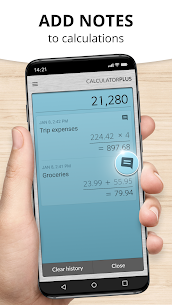
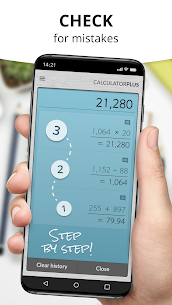
Never lose track of past numbers: Calculator Plus records each operation so you can revisit your computations anytime. It is ideal for budgeting, finishing school assignments, tallying receipts while shopping, or totaling tax figures. Even if you switch apps, your active progress remains saved and ready for your return—eliminating the need to re-enter long formulas.
Sharp Screen and Step-by-Step Overview
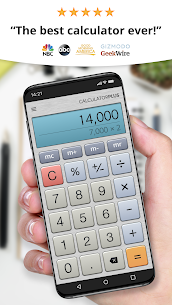
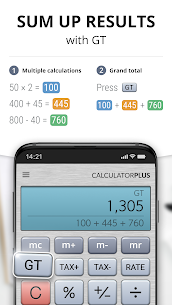
With large, crisp typography and clear comma formatting, digits remain easy to read at a glance. It displays intermediate calculation steps along the way, ensuring you always know where you are within extended equations.
Smart Features for Everyday Precision
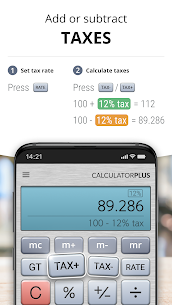
Correct minor typos instantly with the dedicated backspace key instead of wiping the entire screen. The app also features an on-screen memory display to monitor running totals in plain sight, with advanced memory buttons easily revealed via a quick swipe. In addition, the percentage tool shows the exact math behind each result, giving you complete confidence in your final answers.
The Ideal Digital Alternative to Physical Calculators
Featuring a sleek interface alongside practical tools, Calculator Plus turns everyday math into a breeze across Android phones and tablets. Its crystal-clear screen, automatic calculation logs, and user-friendly layout make traditional physical calculators completely obsolete.
Screenshots
Download Links
5
Join Our Community on GameMod.dev
How to Install Calculator Plus Mod APK?
1. Open the downloaded Calculator Plus Mod APK file on your device.
2. Select Install to begin the setup.
3. Complete the installation by following the on-screen prompts.
Important Note:
- Make sure to uninstall any older standard or modded versions prior to setting up this new release.
- Log in using your standard email or connected social accounts if prompted; Google account login is not supported in modified apps.
- Have fun!
Similar Applications
Aloha Browser 9.4.10 Aloha Mobile 240 MB Perplexity 2.203.0 PerplexityAI 130 MB WPS Office 26.12.10 WPS SOFTWARE PTE. LTD. 185 MB ColorNote 4.9.2 Notes 13 MB Alarmy 27.0.0 Sleep Tracker & Alarm Clock by Delightroom 125 MB
More by Digitalchemy LLC
Voice Recorder Plus 1.14.7 Digitalchemy LLC 14.44 MB Fraction Calculator Plus 6.1.6 Digitalchemy LLC 8.89 MB Flashlight Plus 2.8.19 Digitalchemy LLC 8.74 MB Currency Converter Plus 3.2.1 Digitalchemy LLC 33.28 MB PDF Scanner Plus 1.3.22 Digitalchemy LLC 41.49 MB
How to install
- Download the APK file above to your phone.
- Allow “Install unknown apps” when prompted.
- Open the downloaded APK and tap Install.
- If the package includes OBB/XAPK data, follow the bundled instructions.
MOD APKs are modified builds, so Play Protect may show a warning. Install only if you trust the file; use at your own risk.