

Screenshots

Description
defimSize
12 MBVersion
3.9.2Requirements
2.3.3 and upGet it on
Report this app
Images
Mod Info
- Donate Version Unlocked
Description
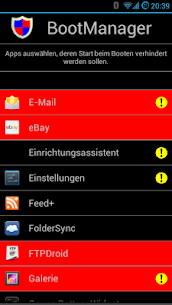
BootManager Donate With this app modul you could prevent selected apps of running on system startup. Only apps with the permission BOOT_COMPLETED are shown in the list. System apps are marked with an exclamation mark.
IMPORTANT
Your device has to be rooted to install the required X-posed framework: http://tinyurl.com/cd46qco
Description for non-developers:
Each app with permission “android.permission.RECEIVE_BOOT_COMPLETED” is placed in a (Windows slang) “startup folder”. For my 200 installed apps that are about 33%. On system boot every of these apps gets started. Possible options:
– app shows a notification
– app starts a (hidden) service in background
– app exits again (eg user has set an option)
If you disable an app in the BootManager it does not get that event and is not started at *next system boot*.
ReceiverStop
An app still starts at system boot? Android has many other events which could start an app!
Example: Skype has the permission “android.permission.MOUNT_UNMOUNT_FILESYSTEMS”. This means, (again Windows slang) if you insert a DVD into you drive, “autorun” is executed and starts Skype.
Note: As your sd-card is mostly always inserted, this could be used to start apps at system boot….Other triggers are: A BlueTooth device (dis-)connect, connection type changes (2g/3g/wlan) or power adapter is (un-)plugged.
All these could be restriced with my other app “ReceiverStop”. Be carefull and do not disable the wrong.
Related apps
APN Varies with device APN Tech Ltd. Premium Unlocked AdGuard 4.16.0 ADGUARD SOFTWARE LIMITED 56.82 MB Premium Unlocked Full Battery Charge Alarm 1.0.368 Syrupy 5.84 MB Premium Unlocked 1DM+ 20.0 Vicky Bonick 176.91 MB Full Version Video Converter, Compressor 20.16.0 Inverse.AI 60.07 MB Premium UnlockedHow to install
- Download the APK file above to your phone.
- Allow “Install unknown apps” when prompted.
- Open the downloaded APK and tap Install.
- If the package includes OBB/XAPK data, follow the bundled instructions.
MOD APKs are modified builds, so Play Protect may show a warning. Install only if you trust the file; use at your own risk.