

Screenshots



Description
Automatic Call Recorder Pro - Call RecordingBy installing this application, you will be able to record all calls in various formats. If you need to remember what was discussed, you can simply listen to it from the archive.
Characteristics
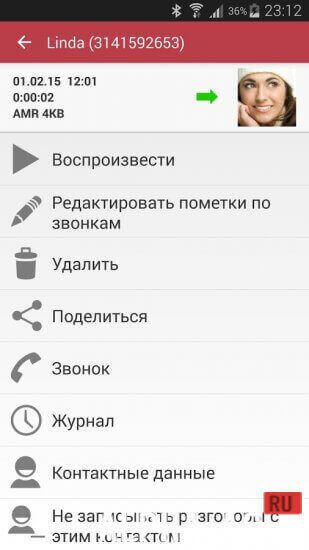
You can decide which calls to record and which not to. Immediately after the call ends, a menu will appear, offering to save, delete, or listen to the recorded conversation.
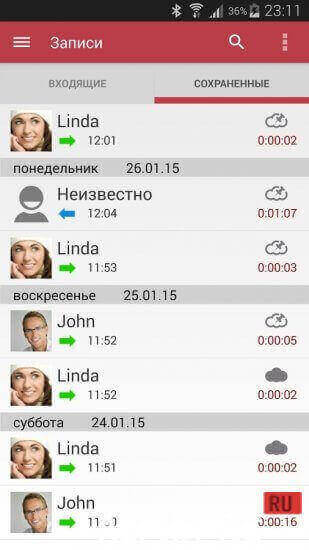
You will be given a few seconds to make a choice. If you don't have time to press the corresponding button or don't want to do so, the recording will be saved automatically, which is very convenient. All recorded calls are saved in the "Incoming" folder.
However, if desired, you can move this folder to the memory card. You can also set the size of this folder yourself. The number of recorded calls depends only on the amount of free memory on the phone.
Main advantages
If you want to save an important call, you can easily do so by selecting the appropriate function. If you don't save important recordings, automatically saved audio will be deleted automatically as new ones appear.
If you need to find a saved recording in the "Incoming" folder, you can search by note, contact information, and phone number.You can download Automatic Call Recorder Pro for Android (Android) completely free of charge from us
3 23 Aug Additional information:- Required Android version: 6.0 or higher
- Age restrictions: 3+
- Russian localization: present
- Cache installation: not required
Subscribe to our YouTube channel!
Add a commentHow to install
- Download the APK file above to your phone.
- Allow “Install unknown apps” when prompted.
- Open the downloaded APK and tap Install.
- If the package includes OBB/XAPK data, follow the bundled instructions.
MOD APKs are modified builds, so Play Protect may show a warning. Install only if you trust the file; use at your own risk.