

Screenshots





Description
joaomgcdSize
7 MBVersion
1.2.6Requirements
5.0Get it on
Report this app
Images
mod info
● Full version unlocked
● Google Maps work
Description
AutoLocation is a Tasker plugin that lets you know when you’re walking, in a vehicle, cycling, standing still or tilting the device, or when you’re in a certain geographical area or spot and react to that information any way you like!
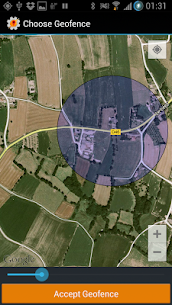
Geofencing is a new powerful location algorithm provided by Google that lets you track your location with higher accuracy and lower power consumption than ever before.
The new Android Fuse Location Provider uses all your device’s location sensors to give you the best location updates possible. No longer rely on just “Net” or “GPS” like in Tasker. You can even not use any battery at all and only get location updates when other apps request them!
(WARNING: YOU MUST HAVE TASKER INSTALLED FOR THIS APP TO BE OF ANY USE: AutoLocation is only usable as a plugin in Tasker. Please don’t rate it negatively because of this.)
To use AutoLocation you must unlock the app. You have 2 options:
– Try app for free for 7 days, available in-app
– Buy AutoLocation unlock key: _http://goo.gl/ENxuc
If you don’t unlock the app in either of these ways, the AutoLocation Tasker conditions will never be matched.
Please contact me by email if anything is wrong and I’ll respond to you promptly and try to fix it as soon as I can. Thank you
Activity Monitor:
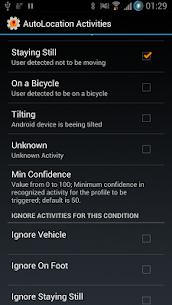
– Change your settings or do any Tasker action based on your current activity
– Activities include walking, in a vehicle, cycling, standing still or tilting the device
– Advanced matching options like level of confidence of an activity and ignoring certain activities while doing others (like ignoring phone tilting while walking)
– You have access to these Tasker variables in the Entry Task (and only in the Entry Task) of an “AutoLocation Activities” condition:
– %alactivity (IN_VEHICLE = 0; ON_BICYCLE = 1;ON_FOOT = 2; STILL = 3; UNKNOWN = 4; TILTING = 5;)
– %alactivitydesc (description for the above code)
– %alactivityconf (confidence level that the detected activity is correct; from 0 to 100)
– You can activate or deactivate the Activity Monitor at any time with a Tasker plugin action
Geofence Monitor:
– Change your settings in Tasker based on your physical location
– Please leave Wifi on when using Geofences. Users have reported that these don’t work well when Wifi is off.
– Geofencing is a new powerful algorithm provided by Google that is more battery efficient and more accurate than Tasker’s built in location condition. Take a look at this video presentaion to see how it compares to the regular tracking methods Tasker uses: http://goo.gl/Pf1bj
– Add as many as 100 Geofences to always keep track of your whereabouts
– If you find you are being reported to enter and exit a Geofence several times in a row try making the Geofence circle a bit bigger
– Long-touch the map while adding a Geofence to switch between views (normal, sattelite or hybrid)
Fuse Location Monitor:
– Get your location using high-accuracy, better battery life or using no battery at all!
– Variables available on the Location condition’s entry task:
– %alaccuracy
– %albearing
– %alspeed
– %altime
– %alaltitude
– %allatitude
– %allongitude
– %alprovider
IMPORTANT: You can enable/disable/toggle these monitors from inside Tasker itself with the “AutoLocation Activities” and “AutoLocation Geofences” plugin actions
Use cases:
– If you like to jog on saturdays, start music player when the walking activity is detected on a saturday morning
– Start navigation app if the “in vehicle” activity is detected right after you left the “Home” geofence
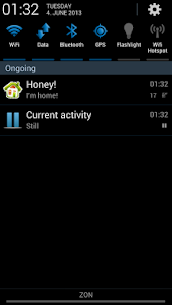
– Make phone silent if you’re in the “Work” geofence and are in the “Still” activity
– Send an AutoRemote Notification to your wife when you enter the “Market” geofence, asking her if she needs anything
– And many many more!Your limit is your imagination!
Developer's apps
Tasker 6.7.6-beta joaomgcd 30 MB Full Version AutoTools 2.3.19 joaomgcd 8 MB AutoLaunch 1.1.4 joaomgcd 5 MB AutoVoice 4.0.14 joaomgcd 14 MB AutoCast 1.5.1.bf joaomgcd 4 MBRelated apps
Computer Science Calculations 4.5.0 Ettore Gallina 29.87 MB Pro Unlocked Poke Genie 8.19.1 Poke Genie 107.92 MB Speechify 6.4.0 Speechify - Voice AI Assistant 139.56 MB Premium Unlocked Stay Focused 13.0.3 INNOXAPPS LLP 21.19 MB Premium Unlocked To Do List 5.1.15 Splend Apps 21.38 MB Premium UnlockedHow to install
- Download the APK file above to your phone.
- Allow “Install unknown apps” when prompted.
- Open the downloaded APK and tap Install.
- If the package includes OBB/XAPK data, follow the bundled instructions.
MOD APKs are modified builds, so Play Protect may show a warning. Install only if you trust the file; use at your own risk.